Extended Features List
Ultimate Blueprint Generator - Detailed Feature List
The Ultimate Co-Pilot: A New Era of Creation in Unreal Engine
I began with a simple, powerful idea: to turn your words into Blueprints. The Ultimate Blueprint Generator was born from that vision, and it changed the workflow for developers around the world.
But a generator, by its nature, only creates. It doesn’t understand. It doesn’t collaborate. This update changes everything.
I have fundamentally reimagined what a development assistant can be. This is no longer just a generator. It has transcended its original purpose to become a true, Engine-Wide AI Co-Pilot. It’s a conversational partner with a deep, contextual understanding of your entire project, from the Content Browser to the level viewport to the deepest corners of your Blueprint graphs.
This is not an iteration. This is the next evolution.
Welcome to the future of how you will create in Unreal Engine.
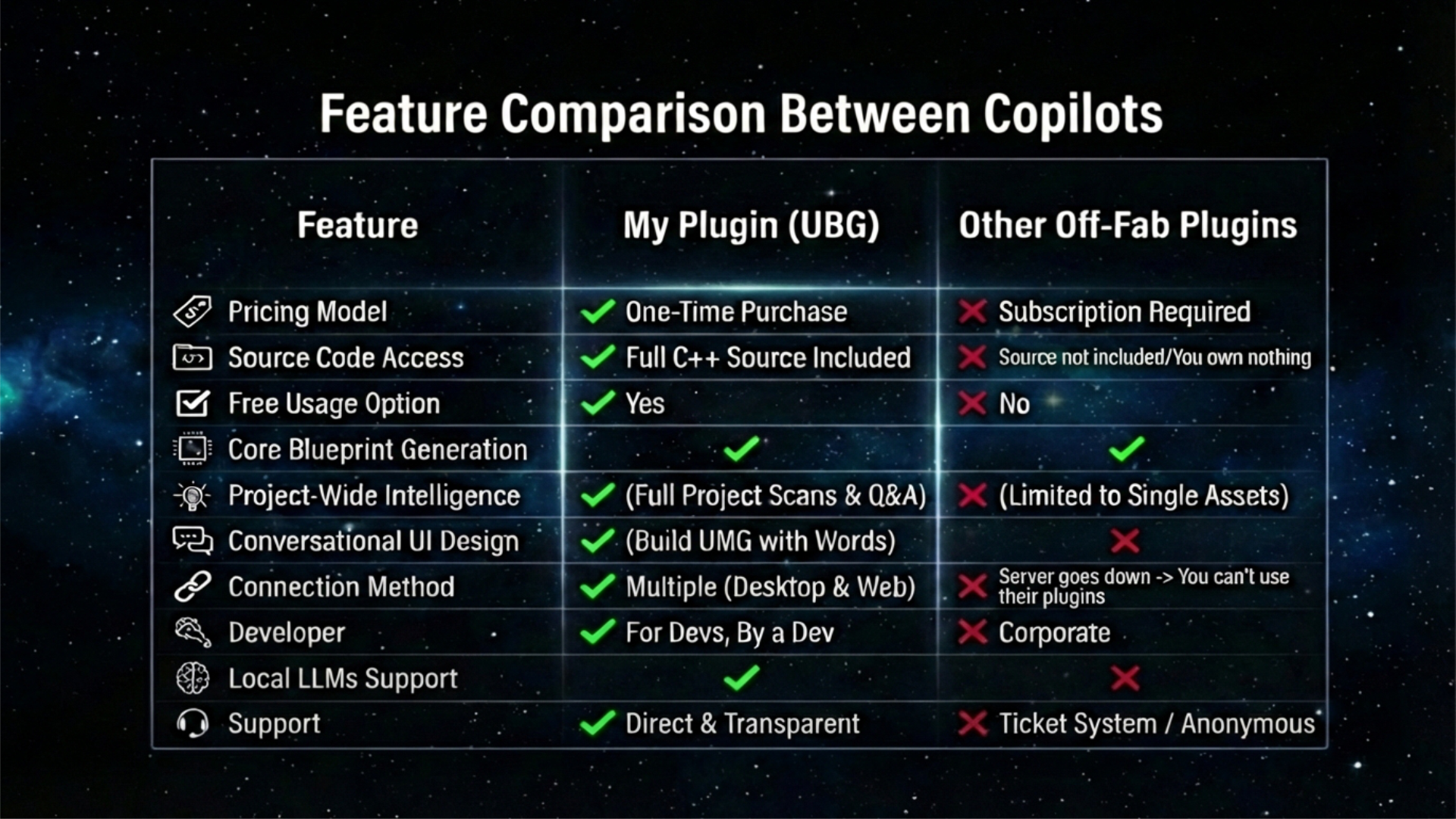
Core Capabilities: The Three Pillars of the Co-Pilot
The Co-Pilot’s power is built on three distinct pillars, transforming you from a simple developer into an Architect, a Director, and an Analyst.
- The Architect: The Master of Blueprints & Data Assets
- The Director: The Commander of Scenes & UI
- The Analyst: The Intelligence of the Entire Project
Pillar 1: The Architect (Blueprints & Data Assets)
The soul of your game is its logic and structure. The Architect gives you unprecedented power to build, refine, and understand it.
Conversational Blueprint Architecture
The core of the plugin, now supercharged with cleaner layouts and more reliable generation.
- Generate Logic: Create complex, multi-node functions and events from a single prompt, which are now automatically organized into clean, readable layouts.
- Modify & Extend: Select any node in an existing graph and say, “After this, check if the player is valid and branch.” The Co-Pilot will seamlessly insert the new logic, wiring everything up for you.
- Refactor with a Command: Highlight a messy spaghetti-graph and say, “Refactor this into a clean function called ‘CalculateDamage’.” The Co-Pilot will create the new function and move the logic inside.
AI-Powered Asset Analysis
You can’t improve what you don’t understand. The Co-Pilot is now your personal asset reviewer.
- Explain Anything: Select a Blueprint, Material, Behavior Tree, Animation Blueprint, or Widget Blueprint in the Content Browser, or a confusing network of nodes inside their editors, and ask, “Explain this to me.” You’ll get a detailed breakdown of what it does, how it works, and even potential improvements.
- Export for Documentation: Command the AI to export any explanation to a .txt file, creating instant documentation for your team.
Instant Asset & Project Scaffolding
Build the skeleton of your project in seconds.
- Command-Line Asset Creation: Say, “Create a new Character Blueprint named ‘BP_Hero’ in a new folder called ‘Blueprints/Player’.” The Co-Pilot will create the folder structure and the new asset.
- Data Asset Generation: Create and populate User Defined Structs and Enums from high-level concepts. For example, “Create a struct for item stats with variables for damage, durability, and rarity.”
Pillar 2: The Director (Scenes & UI)
Your game is a stage. The Director gives you the power to command it in real-time.
Real-Time Scene Direction (Experimental)
The Co-Pilot now has eyes in your level viewport.
- Precise Actor Spawning: “Spawn a ‘BP_ExplosiveBarrel’ at location 100, 50, 200.”
- Bulk & Procedural Placement: “Find the volume named ‘SpawnZone’. Fill it with 50 ‘SM_Rock_01’ static meshes with random rotation.” Populate entire areas of your level with a single sentence.
- Intelligent Actor Selection: “Select all actors in the level with the ‘Enemy’ tag,” or “Select all Point Lights.”
Conversational UMG Design (Experimental)
Stop wrestling with the UMG editor. The Co-Pilot is now an expert UI designer.
- Build Your UI with Words: “Create a main menu widget. It should have a centered vertical box with three buttons for ‘Start’, ‘Options’, and ‘Quit’.” The AI now understands complex layouts and creates them in one operation.
- Modify with Ease: “Anchor the ‘InventoryButton’ to the bottom-left and give it 20 padding.” Prototyping UI is no longer a chore.
Pillar 3: The Analyst (Project-Wide Intelligence)
The Co-Pilot can zoom out and see your entire project, providing insights that were previously impossible.
AI-Powered Performance Audits
Find problems before they become critical.
- Project-Wide Scan: Command the Co-Pilot to scan your entire project for performance hotspots. It will analyze every Blueprint, Material, Widgets, AnimBPs and Behavior Trees and deliver a comprehensive report.
- Actionable Insights: The report will identify issues like: BP_EnemyAI is using expensive operations on Event Tick, or M_MasterLandscape has a high instruction count.
Project-Wide Q&A (Your Codebase is its Knowledge Base)
Ask questions about your own project and get intelligent answers.
- Find Anything: “Where in my project do I handle player health?”
- Understand Connections: “Which Blueprints use the ‘BPI_Damageable’ interface?”
The Co-Pilot scans and indexes your project, turning your codebase into a searchable, intelligent database.
External Code Analysis
The Co-Pilot’s intelligence now extends beyond the project itself.
- Read & Understand C++: Point the AI to an external plugin’s source directory. It can read .cpp and .h files to help you understand how third-party code works.
- Write C++ (With Confirmation): Propose changes to external C++ files and, after you confirm, the AI will write them directly to the file.
Feature Summary (At a Glance)
This is a high-level overview of the core functionalities.
- Blueprint Architecture: Generate, modify, extend, refactor, and get detailed explanations for any Blueprint graph or selected nodes.
- Project & Asset Management: Create new assets on the fly, including Blueprints and folders, directly in the Content Browser.
- Real-Time Scene Direction: Spawn, select, and manipulate actors directly in the level viewport with conversational commands.
- Conversational UI Design: Build and modify UMG widgets and their properties using natural language.
- Project-Wide Intelligence: Scan your entire project to find performance hotspots and ask contextual questions about your codebase.
- Component & Variable Control: Add and modify components or variables to any Blueprint without ever opening the editor.
Detailed Feature Breakdown
1. Blueprint Graph Architecture & Analysis
The core of the plugin has evolved from a simple generator into a full-fledged logic architect.
Conversational Generation & Modification:
- Generate Logic: Create complex logic from scratch in any function, event, or the main event graph.
- Modify & Extend: Select any node in an existing graph and ask the assistant to add new logic seamlessly after it, making iteration and bug-fixing incredibly fast.
AI-Powered Analysis & Refactoring:
- Explain Anything: Select a confusing group of nodes—or an entire Blueprint asset—and ask the assistant for a detailed, step-by-step explanation of what it does and how it works.
- Intelligent Refactoring: Highlight a messy section of your graph and command the assistant to refactor it into a new, clean, and optimized pure or impure function, automatically replacing the old nodes with a call to the new one.
2. Project & Asset Management
The assistant now operates in the Content Browser, allowing you to build the foundations of your project without ever touching the mouse.
Asset Creation:
- New Blueprints: Create new, fully functional Blueprint classes (Actors, Pawns, Character, etc.) in any folder with a simple command.
- Folders: Instantly create new folder structures to keep your project organized.
Material Creation & Application:
- Create simple, colored materials and instantly apply them to one or multiple actors in your scene.
3. Real-Time Scene & Level Direction (Experimental)
The co-pilot can now see and interact with your level, turning you into a scene director.
Actor Spawning:
- Precise Placement: Spawn any actor class at a specific location, rotation, and scale.
- Volume & Procedural Placement: Spawn hundreds of actors within a selected volume or in a randomized area, perfect for populating scenes with props, foliage, or enemies.
Actor Selection & Manipulation:
- Advanced Selection: Select actors by name, by class, or by location. For example, “Select all ‘StaticMeshActors’ in the ‘PostProcessVolume’.”
- Bulk Editing (via Materials): Apply materials to your entire selection at once for rapid look development.
4. Conversational UI (UMG) Design (Experimental)
Prototype and build your game’s UI with simple, conversational commands.
- Widget Creation: Add new widgets (Buttons, Text, Images, etc.) to any existing User Widget Blueprint.
- Property Editing: Modify the properties of any widget, including its name, parent, and layout details on a Canvas Panel (e.g., position, size, anchors, alignment).
5. Project-Wide Intelligence & Optimization
The assistant can now scan and understand your entire project, providing insights that were previously impossible to get.
Performance Analysis:
- Initiate a project-wide scan to identify potential performance hotspots. The assistant will analyze all your Blueprints and generate a report on issues like inefficient Event Tick usage, overly complex graphs, or frequent casting.
Project Q&A (RAG):
- Ask contextual questions about your entire project. For example, “Which of my Blueprints handle player damage?” or “Find the function that calculates player score.” The assistant will use its indexed knowledge of your codebase to provide accurate answers.
Conclusion: This is Just the Beginning
Ultimate Blueprint Generator is no longer just a name, it’s a mission statement. I’m building the ultimate co-pilot, a tool that will fundamentally change your workflow in Unreal Engine. You are no longer just a user of the engine, you are its commander.
Welcome to the new workflow.
Last Updated: 26th January 2026