시작하기
시작하기
방금 플러그인을 샀다(또는 살 참이다). 다음 10분이 너를 “zip 다운로드 완료”에서 “AI가 나를 위해 Blueprint를 만들고 있다”로 데려간다. 여기 전체 여정이 있다.
순서대로 진행한다:
- 엔진에 플러그인 설치
- 라이선스 활성화
- 플러그인 창 열기
- 첫 AI 프롬프트 보내기
어떤 단계에서 막히면 맨 아래의 트러블슈팅으로 점프.
시작 전에 — 필요한 것
| 항목 | 왜 |
|---|---|
| Unreal Engine 5.4, 5.5, 5.6, 또는 5.7 | 플러그인은 에디터 안에서 동작 |
| Windows, macOS, 또는 Linux | 셋 다 동작 |
| FAB Marketplace 주문 ID 또는 우리 사이트의 라이선스 키 | 너의 머신에서 플러그인 활성화 |
리스트는 그게 전부다. API 키 필요 없음, Python이나 다른 어떤 것도 설치할 필요 없음. 플러그인은 소량의 기본 제공 AI 허용량과 함께 출하된다. 활성화가 끝나는 순간 사용해볼 수 있다.
1단계 — 플러그인 설치
FAB Marketplace 에서 플러그인을 샀다. 이제 엔진에 설치한다.
- Epic Games Launcher를 연다.
- Library로 간다.
- 너의 구매 항목에서 플러그인을 찾고 Install to Engine을 클릭.
- 설치할 엔진 버전을 고른다(5.4, 5.5, 5.6, 또는 5.7). 여러 버전에 설치할 수 있다 — 사용할 것을 고른다.
- 설치가 끝나기를 기다린다. 보통 1-2분.
이제 너의 Unreal Engine 프로젝트를 연다:
- 상단 메뉴의 Edit → Plugins로 간다.
- **“Ultimate Engine Co-Pilot”**을 검색.
- 체크박스를 체크해서 활성화.
- 에디터가 재시작을 요청한다. Restart Now를 클릭.
에디터가 돌아오면 플러그인은 설치됐지만 아직 활성화되지 않았다. 다음 단계.
2단계 — 라이선스 활성화
플러그인을 활성화하고 에디터가 처음 다시 열릴 때 활성화 창이 팝업된다. 두 가지 방법이 있다 — 구매 방식에 맞는 것을 고른다.
FAB Marketplace에서 샀다면
- FAB Marketplace 탭을 클릭.
- FAB에서 사용한 이메일 주소를 입력.
- 너의 FAB Order ID를 입력.
A로 시작하고 16자리 숫자가 따라온다,A1234567890123456같은. FAB가 구매 시 보낸 이메일에서 찾을 수 있다. - Submit Order를 클릭.
- 기다린다. 검증은 보통 5분 이내에 끝난다 — 플러그인이 자동으로 체크한다. 활성화되면 창이 업데이트된다.
우리 사이트에서 샀다면
- Website Purchase 탭을 클릭.
- 너의 라이선스 키를 입력.
XXXXX-XXXXX-XXXXX-XXXXX같은 형태. - Activate License를 클릭.
어느 쪽이든, 활성화가 성공하면 플러그인은 너의 머신에 묶인다. 한 번만 하면 된다. 활성화는 이 컴퓨터의 모든 프로젝트에 적용되고 에디터 재시작 후에도 유지된다.
3단계 — 플러그인 열기
다음 중 하나로 플러그인 창을 연다:
- Window 메뉴 → Ultimate Engine Co-Pilot, 또는
- 상단 툴바의 플러그인 아이콘
창은 왼쪽 상단에 4개의 메인 탭과 함께 열린다:
| 탭 | 용도 |
|---|---|
| Blueprint Architect | 메인 채팅. 네가 원하는 것을 입력하면 AI가 만든다. |
| Project Scanner | 프로젝트 전체를 인덱싱해서 AI가 그 안의 어떤 것에 대해서도 답할 수 있게 한다. |
| Tools | 플러그인 유틸리티에 빠르게 접근 — 이미지 생성, 메시 생성, 사운드 생성 등. |
| Learn | 내장 코스, 튜토리얼, 플러그인을 안내하는 스킬 트리. |
오른쪽 상단의 톱니바퀴 아이콘과 왼쪽 하단의 Settings 버튼도 보일 것이다 — 둘 다 같은 Settings 패널을 연다. 거기서 AI 제공자, 테마, 음성 및 다른 모든 것을 구성한다.
왼쪽 하단 스트립에는 Instructions, GDD, AI Memory의 단축키도 있다 — 나중에 만날 기능들. 첫 프롬프트를 위해 Blueprint Architect를 클릭.
4단계 — 첫 프롬프트 시도
너는 채팅에 있다. 아래 메시지 박스에 입력:
Create a third person character with movement and a health systemEnter를 누른다(또는 Send를 클릭).
AI가 실시간으로 작업하는 것을 본다:
- AI의 계획이 담긴 메시지 버블이 나타난다
- AI가 Blueprint를 만들고, component를 추가하고, variable을 설정하고, 로직을 연결하는 동안 tool call이 스크롤된다
- 끝나면 프로젝트에 동작하는 Blueprint가 생긴다
그게 전부다. 너는 가동 중.
뭔가 더 구체적인 것을 원하면 다음 중 하나를 시도:
Make me a UI widget with a health bar that fills based on a player variableCreate a Niagara system that emits sparks when an actor takes damageBuild a save system that stores player position and inventoryAI가 모두 처리한다.
기본 제공 스타터 티어
플러그인은 활성화 즉시 체험할 수 있도록 소량의 기본 제공 스타터 허용량과 함께 제공된다. 가입 없음, API 키 없음, 결제 없음.
이것은 스타터 티어다. 플러그인이 작동하는 모습을 확인하기에 충분한 양이다. 허용량이 줄어들면 리셋을 기다리거나, 자신의 AI 제공자를 설정할 수 있다(OpenAI, Claude, Gemini, DeepSeek, 로컬 모델 등 지원. AI 제공자 참고). 그것이 실제로 무제한 사용하는 길이다.
제공자 슬롯과 ALT+1 ~ ALT+9 단축키
플러그인은 9개 제공자 슬롯을 주고, 왼쪽 ALT + 1부터 왼쪽 ALT + 9로 전환 가능하다. 각 슬롯은 독립적으로 구성 가능하다(한 슬롯은 스타터 티어를 사용하도록, 다른 하나는 Claude API 키를, 다른 하나는 로컬 LLM을 실행하도록, 다른 하나는 Claude Code 같은 CLI 에이전트를 구동하도록 등 설정할 수 있다).
언제든 ALT+3을 누르면 활성 슬롯이 슬롯 3으로 전환된다. 전환을 확인하는 작은 토스트가 팝업된다(예: “Switched to: Claude API”). 변경은 네가 보내는 다음 메시지에 적용된다 — AI가 현재 생성 중인 응답은 옛 슬롯을 통해 끝나고, 다음 프롬프트는 새 슬롯을 통해 나간다. 이를 통해 대화 흐름을 깨지 않고 단일 키 입력으로 저렴하고 빠른 것과 강력하고 비싼 것 사이를 전환할 수 있다.
지원 엔진과 플랫폼
| 엔진 버전 | 상태 |
|---|---|
| Unreal Engine 5.4 | 지원 |
| Unreal Engine 5.5 | 지원 |
| Unreal Engine 5.6 | 지원 |
| Unreal Engine 5.7 | 지원 |
| 플랫폼 | 상태 |
|---|---|
| Windows | 지원 |
| macOS | 지원 |
| Linux | 지원 |
플러그인은 에디터 전용 — 게임을 만드는 것을 도와주지만 출시하는 게임에는 포함되지 않는다. 너의 플레이어는 절대 필요하지 않다.
플러그인 업데이트
업데이트에는 두 가지가 있다.
새 플러그인 버전
버그 수정이나 새 기능과 함께 새 버전을 출하할 때:
- Epic Games Launcher를 연다.
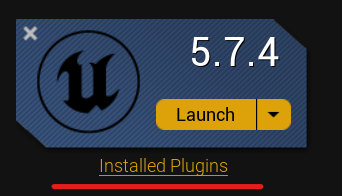
- Library → 너의 엔진 버전 아래의 Installed Plugins를 클릭.
- 업데이트가 가능하면 플러그인 옆에 Update 버튼이 보인다.
- Update를 클릭하고 설치를 기다린다.
- Unreal Editor를 재시작.
클라우드 콘텐츠 업데이트
일부는 백그라운드에서 자동으로 업데이트된다 — AI 프롬프트 파일, 툴 문서, 모델 리스트. 이를 받기 위해 다시 설치할 필요 없다. 플러그인이 로드된 에디터를 다음에 시작할 때 동기화된다.
현재 플러그인 버전(과 클라우드 업데이트 상태)을 Settings → Updates에서 볼 수 있다.
플러그인 제거 또는 재설치
뭔가 잘못됐고 깨끗하게 시작하고 싶다면:
1단계 — 엔진에서 제거
- Epic Games Launcher를 연다.
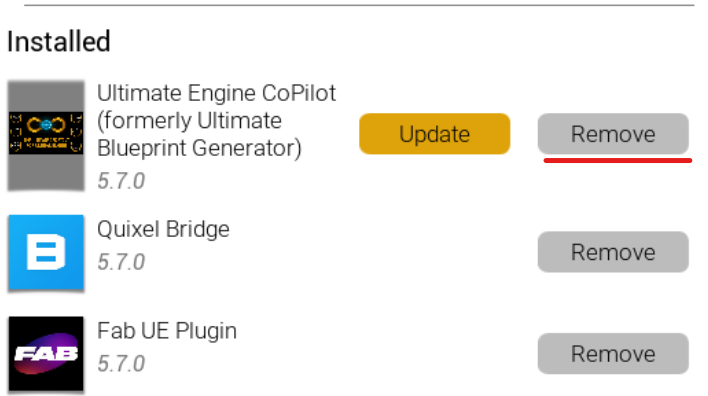
- Library → Installed Plugins로 간다.
- 플러그인을 찾고 Remove를 클릭.
2단계 — 잔여 파일 삭제(Windows 경로 표시)
제거 후 남은 게 없는지 확인한다. 파일 탐색기를 열고 다음으로 간다:
C:\Program Files\Epic Games\UE_5.X\Engine\Plugins\Marketplace\UltimateBlueprintGenerator5.X를 너의 엔진 버전으로 교체. 폴더가 아직 있으면 삭제.
폴더 이름에 대한 참고: 플러그인의 사용자용 브랜드는 Ultimate Engine Co-Pilot이지만, 디스크의 폴더는 더 오래된 이름(UltimateBlueprintGenerator)을 유지한다. 이는 의도적 — 이름을 바꾸면 저장된 설정이 사라진다.
3단계 — 재설치
너의 FAB Library로 돌아가서, 플러그인을 찾고, Install to Engine을 클릭하고, 너의 엔진 버전을 고른다. 새 사본을 받는다.
너의 활성화는 여전히 적용된다 — 라이선스 키나 주문 ID를 다시 입력할 필요 없다.
트러블슈팅
활성화 창이 나타나지 않는다. 플러그인은 활성화 후 첫 실행에서만 활성화 창을 보여준다. 플러그인 창을 수동으로 연다(Window → Ultimate Engine Co-Pilot) — 활성화는 License 아래의 Settings 패널에 나타난다.
검증이 5분 이상 걸린다. FAB은 가끔 지연된다. 활성화 창을 열어 둘 수 있다 — 30초마다 자동으로 체크한다. 30분이 결과 없이 지나면 입력한 주문 ID와 이메일이 FAB 영수증의 것과 정확히 일치하는지 다시 확인.
플러그인이 Plugins 메뉴에 나타나지 않는다. 올바른 엔진 버전에 설치했는지 확인. 여러 버전에 설치 가능 — 각 설치는 분리돼 있다. 활성화 후 에디터 재시작.
스타터 티어가 즉시 “rate limited”를 보여준다. 다른 프로젝트에서 스타터 허용량을 사용했을 수 있다. 플러그인 상태 영역에 표시되는 일정에 따라 재설정된다. 기다리는 동안 Settings → AI Models에서 자기 AI 제공자를 연결할 수 있다(AI 제공자 참고).
이 리스트에 없는 것에 부딪히면 FAQ가 더 많은 엣지 케이스를 다룬다. 그래도 막혀? Discord에서 우리를 만나라.
다음에 읽을 것
이제 가동 중이니 가장 유용한 다음 읽을거리:
- Blueprint Architect — 네 가지 상호작용 모드(just chat, ask before edit, plan, auto edit)를 포함한 AI 채팅 상세
- AI 제공자 — 무제한 사용을 위해 자기 OpenAI / Claude / Gemini 키 사용 방법
- Project Scanner — 프로젝트 전체를 인덱싱해서 AI가 그 안의 어떤 것에 대해서도 추론할 수 있게 한다
환영한다.