はじめに
はじめに
プラグインを購入したばかり(または今から購入)。次の10分で「zipダウンロード済み」から「AIがBlueprintを作ってくれている」まで進める。これが全行程。
順番にやっていこう:
- プラグインをエンジンにインストール
- ライセンスを有効化
- プラグインウィンドウを開く
- 最初のAIプロンプトを送信
どこかで詰まったら、一番下のトラブルシューティングにジャンプ。
始める前に — 必要なもの
| もの | なぜ |
|---|---|
| Unreal Engine 5.4、5.5、5.6、または5.7 | プラグインはエディター内で動作 |
| Windows、macOS、またはLinux | 3つすべて動作 |
| FAB MarketplaceのOrder ID または 当サイトのライセンスキー | あなたのマシンでプラグインを有効化 |
リストはこれだけ。APIキーは不要、Pythonや他の何かをインストールする必要もない。 プラグインには小さな組み込みのAI利用枠が付属している。有効化が完了した瞬間に試せる。
ステップ1 — プラグインのインストール
FAB Marketplace でプラグインを購入した。これからエンジンにインストールする。
- Epic Games Launcherを開く。
- Libraryに行く。
- 購入の中からプラグインを見つけ、Install to Engineをクリック。
- インストールするエンジンバージョンを選ぶ(5.4、5.5、5.6、または5.7)。複数にインストール可能 — 使うものを選ぶ。
- インストール完了を待つ。通常1-2分。
次にUnreal Engineプロジェクトを開く:
- 上部メニューのEdit → Pluginsに行く。
- **“Ultimate Engine Co-Pilot”**を検索。
- チェックボックスにチェックを入れて有効化。
- エディターが再起動を求める。Restart Nowをクリック。
エディターが戻ると、プラグインはインストール済みだがまだ有効化されていない。次のステップへ。
ステップ2 — ライセンスを有効化
プラグインを有効にしてエディターが初めて再オープンすると、有効化ウィンドウがポップアップする。2つの方法がある — 購入方法に合うものを選ぶ。
FAB Marketplaceで購入した場合
- FAB Marketplaceタブをクリック。
- FABで使ったメールアドレスを入力。
- FAB Order IDを入力。
Aに続く16桁の数字、A1234567890123456のような形式。FABが購入時に送ったメールにある。 - Submit Orderをクリック。
- 待つ。検証は通常5分以内に完了 — プラグインが自動でチェックする。有効化されるとウィンドウが更新される。
当サイトで購入した場合
- Website Purchaseタブをクリック。
- ライセンスキーを入力。
XXXXX-XXXXX-XXXXX-XXXXXのような形式。 - Activate Licenseをクリック。
どちらの場合も、有効化に成功するとプラグインはあなたのマシンに紐づけられる。これは1回だけ。有効化はこのコンピューターのすべてのプロジェクトで有効で、エディター再起動後も保持される。
ステップ3 — プラグインを開く
プラグインウィンドウを次から開く:
- Windowメニュー → Ultimate Engine Co-Pilot、または
- 上部ツールバーのプラグインアイコン
ウィンドウは左上に4つのメインタブで開く:
| タブ | 用途 |
|---|---|
| Blueprint Architect | メインチャット。欲しいものをタイプして、AIが構築する。 |
| Project Scanner | プロジェクト全体をインデックスして、AIがその中の何にでも答えられるようにする。 |
| Tools | プラグインユーティリティへのクイックアクセス — 画像生成、メッシュ生成、サウンド生成など。 |
| Learn | 内蔵コース、チュートリアル、プラグインを案内するスキルツリー。 |
右上の歯車アイコンと左下のSettingsボタンも見える — どちらも同じSettingsパネルを開く。そこでAIプロバイダー、テーマ、音声、その他すべてを設定する。
左下のストリップにはInstructions、GDD、AI Memoryへのショートカットもある — 後で出会う機能。最初のプロンプトにはBlueprint Architectをクリック。
ステップ4 — 最初のプロンプトを試す
チャットにいる。下のメッセージボックスに入力:
Create a third person character with movement and a health systemEnterを押す(またはSendをクリック)。
AIがリアルタイムで作業するのが見える:
- AIの計画が入ったメッセージバブルが表示される
- AIがBlueprintを作成し、componentを追加し、variableを設定し、ロジックを配線する間、ツール呼び出しがスクロールする
- 完了すると、プロジェクトに動作するBlueprintができている
それだけ。 あなたは稼働中。
もっと具体的なものが欲しいなら、これらのいずれかを試す:
Make me a UI widget with a health bar that fills based on a player variableCreate a Niagara system that emits sparks when an actor takes damageBuild a save system that stores player position and inventoryAIがすべて処理する。
組み込みのスタータープラン
プラグインには小さな組み込みのスタータープラン利用枠が付属しており、すぐに試せる。サインアップ不要、APIキー不要、支払い不要。
これはスタータープランだ。プラグインの動作を確認するには十分な量になっている。利用枠が少なくなったら、リセットを待つか、自分のAIプロバイダーをセットアップしよう(OpenAI、Claude、Gemini、DeepSeek、ローカルモデルなどに対応。AIプロバイダーを参照)。それが本格的な無制限利用への道だ。
プロバイダースロットとALT+1からALT+9のホットキー
プラグインは9つのプロバイダースロットを提供し、左ALT + 1から左ALT + 9で切り替え可能。各スロットは独立して構成可能 — 1つのスロットをスタータープラン用、別のスロットをClaude APIキー用、別のスロットをローカルLLM実行用、別のスロットをClaude CodeのようなCLIエージェント駆動用、などに設定できる。
いつでもALT+3を押すとアクティブスロットがスロット3に切り替わる。切り替え確認の小さなトーストがポップアップする(例:“Switched to: Claude API”)。変更は次に送信するメッセージに適用される — AIが現在生成中の返信は古いスロットを通じて完了し、次のプロンプトは新しいスロットを通じて送信される。これにより、会話の流れを壊さずに、安価で高速なものと強力で高価なものの間を1キーストロークで切り替えできる。
サポートされるエンジンとプラットフォーム
| エンジンバージョン | ステータス |
|---|---|
| Unreal Engine 5.4 | サポート |
| Unreal Engine 5.5 | サポート |
| Unreal Engine 5.6 | サポート |
| Unreal Engine 5.7 | サポート |
| プラットフォーム | ステータス |
|---|---|
| Windows | サポート |
| macOS | サポート |
| Linux | サポート |
プラグインはエディターのみ — ゲームを構築するのを助けるが、出荷するゲームには含まれない。プレイヤーは決して必要としない。
プラグインの更新
更新には2種類ある。
新しいプラグインバージョン
バグ修正や新機能を含む新バージョンをリリースしたとき:
- Epic Games Launcherを開く。
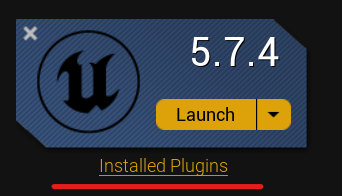
- Libraryに行く → エンジンバージョンの下のInstalled Pluginsをクリック。
- 更新が利用可能な場合、プラグインの横にUpdateボタンが表示される。
- Updateをクリックしてインストールを待つ。
- Unreal Editorを再起動。
クラウドコンテンツの更新
一部のものはバックグラウンドで自動的に更新される — AIプロンプトファイル、ツールドキュメント、モデルリスト。これらを取得するために何も再インストールする必要はない。プラグインがロードされたエディターを次回起動したときに同期する。
現在のプラグインバージョン(およびクラウド更新ステータス)はSettings → Updatesで確認できる。
プラグインの削除または再インストール
何かが間違っていてクリーンスレートが欲しい場合:
ステップ1 — エンジンから削除
- Epic Games Launcherを開く。
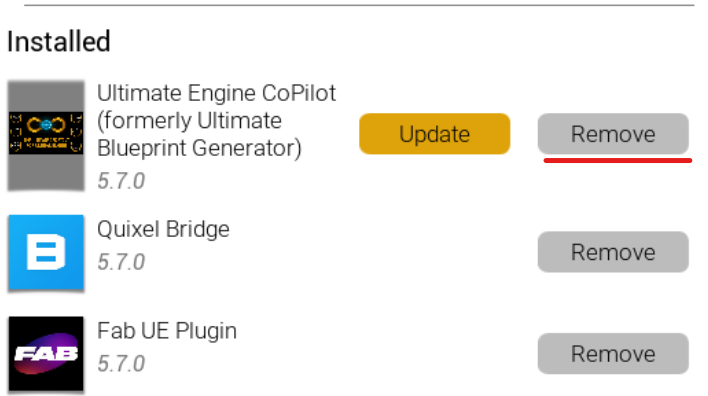
- Library → Installed Pluginsに行く。
- プラグインを見つけてRemoveをクリック。
ステップ2 — 残りのファイルを削除(Windowsパスを表示)
削除後、何も残っていないか確認。ファイルエクスプローラーを開いて以下に移動:
C:\Program Files\Epic Games\UE_5.X\Engine\Plugins\Marketplace\UltimateBlueprintGenerator5.Xをエンジンバージョンに置き換え。フォルダーがまだあれば削除。
フォルダー名についての注意: プラグインのユーザー向けブランドはUltimate Engine Co-Pilotだが、ディスク上のフォルダーは古い名前(UltimateBlueprintGenerator)を保持している。これは意図的 — リネームすると保存された設定が失われる。
ステップ3 — 再インストール
FAB Libraryに戻り、プラグインを見つけ、Install to Engineをクリックしてエンジンバージョンを選ぶ。新しいコピーを取得する。
有効化はまだ適用される — ライセンスキーまたはOrder IDを再入力する必要はない。
トラブルシューティング
有効化ウィンドウが表示されない。 プラグインは有効化後の最初の起動時にのみ有効化ウィンドウを表示する。プラグインウィンドウを手動で開く(Window → Ultimate Engine Co-Pilot)— 有効化はLicenseの下のSettingsパネルに表示される。
検証が5分以上かかっている。 FABには時々遅延がある。有効化ウィンドウを開いたままにできる — 30秒ごとに自動的にチェックする。30分経過しても結果がない場合、入力したOrder IDとメールがFAB領収書のものと正確に一致するか再確認。
プラグインがPluginsメニューに表示されない。 正しいエンジンバージョンにインストールしたことを確認。複数のバージョンにインストール可能 — 各インストールは別個。有効化後にエディターを再起動。
スタータープランがすぐに”rate limited”を表示する。 別のプロジェクトでスタータープランの利用枠を使った可能性がある。プラグインのステータスエリアに表示されるスケジュールに従ってリセットされる。待つ間、Settings → AI Modelsで独自のAIプロバイダーを接続できる。AIプロバイダーを参照。
このリストにないものに当たった場合、FAQはより多くのエッジケースをカバーする。それでも詰まる?Discordで会おう。
次に読むもの
稼働したので、次に最も役立つ読み物:
- Blueprint Architect — 4つのインタラクションモード(just chat、ask before edit、plan、auto edit)を含む、AIチャットの詳細
- AIプロバイダー — 無制限使用のために独自のOpenAI / Claude / Geminiキーを使う方法
- Project Scanner — プロジェクト全体をインデックスして、AIがその中の何でも推論できるようにする
ようこそ。