Pour commencer
Pour commencer
Tu viens d’acheter le plugin (ou tu es sur le point de le faire). Les 10 prochaines minutes te font passer de “zip téléchargé” à “l’IA construit des Blueprints pour moi” Voici le parcours complet.
Nous allons le parcourir dans l’ordre :
- Installe le plugin dans ton moteur
- Active ta licence
- Ouvre la fenêtre du plugin
- Envoie ta première invite AI
Si tu es bloqué à une étape, passe à Dépannage en bas de page.
Avant de commencer - ce dont tu as besoin
| Pourquoi ? |---|---| | Unreal Engine 5.4, 5.5, 5.6, ou 5.7 | Le plugin s’exécute dans l’éditeur | Le plugin s’exécute dans l’éditeur Windows, macOS ou Linux | Le plugin fonctionne dans l’éditeur, sous Windows, macOS ou Linux
C’est toute la liste. Tu n’as pas besoin d’une clé API, tu n’as pas besoin d’installer Python ou quoi que ce soit d’autre. Le plugin est livré avec une petite allocation d’IA intégrée : tu peux l’essayer dès que l’activation est terminée.
Étape 1 - Installer le plugin
Tu as acheté le plugin sur FAB Marketplace. Nous allons maintenant l’installer dans ton moteur.
- Ouvre le Lanceur de jeux d’Epic Games.
- Va dans ta Bibliothèque.
- Trouve le plugin dans tes achats et clique sur Installer sur le moteur.
- Choisis la version du moteur sur laquelle tu veux l’installer (5.4, 5.5, 5.6 ou 5.7). Tu peux l’installer sur plus d’un moteur - choisis celui que tu utiliseras.
- Attends que l’installation se termine. En général, cela prend 1 à 2 minutes.
Ouvre maintenant ton projet Unreal Engine :
- Va dans Édition → Plugins dans le menu supérieur.
- Recherche “Ultimate Engine Co-Pilot ”.
- Coche la case pour l’activer.
- L’éditeur te demandera de redémarrer. Clique sur Redémarrer maintenant.
Lorsque l’éditeur revient, le plugin est installé mais pas encore activé. Prochaine étape.
Étape 2 - Activer ta licence
La première fois que l’éditeur se rouvre avec le plugin activé, une fenêtre d’activation apparaît. Il y a deux façons d’entrer - choisis celle qui correspond à ton mode d’achat.
Si tu as acheté sur FAB Marketplace
- Clique sur l’onglet FAB Marketplace.
- Saisis l’adresse électronique que tu as utilisée sur FAB.
- Saisis ton identifiant de commande FAB. Il commence par
Asuivi de 16 chiffres, commeA1234567890123456. Tu peux le trouver dans l’email que FAB t’a envoyé lors de ton achat. - Clique sur Soumettre la commande.
- Attends. La vérification se termine généralement en moins de 5 minutes - le plugin vérifie automatiquement. La fenêtre se met à jour lorsque tu es activé.
Si tu as acheté sur notre site
- Clique sur l’onglet Achat sur le site Internet.
- Saisis ta clé de licence. Elle ressemble à
XXXXX-XXXXX-XXXXX-XXXXX. - Clique sur Activer la licence.
Quoi qu’il en soit, une fois l’activation réussie, le plugin est lié à ta machine. Tu ne fais cette opération qu’une seule fois. L’activation s’applique à tous les projets sur cet ordinateur et survit au redémarrage de l’éditeur.
Étape 3 - Ouvrir le plugin
Ouvre la fenêtre du plugin à partir de
- Menu Fenêtre → Ultimate Engine Co-Pilot, ou bien
- L’icône du plugin dans la barre d’outils supérieure
La fenêtre s’ouvre avec quatre onglets principaux le long du haut à gauche :
| Onglet | À quoi ça sert |
|---|---|
| L’architecte de plans bleus** | Le chat principal. Tu saisis ce que tu veux, l’IA le construit. |
| L’IA peut ainsi répondre à des questions sur tout ce qui s’y trouve. | |
| L’accès rapide aux utilitaires du plugin - génération d’images, génération de maillages, génération de sons, et bien d’autres choses encore. | |
| Apprentissage** | Des cours intégrés, des tutoriels et un arbre de compétences pour te guider dans l’utilisation du plugin. |
Tu verras également une icône d’équipement en haut à droite et un bouton de réglage en bas à gauche - tous deux ouvrent le même panneau de réglage. C’est là que tu configures les fournisseurs d’IA, les thèmes, la voix et tout le reste.
La bande en bas à gauche comporte également des raccourcis vers Instructions, GDD et Mémoire d’IA - des fonctions que tu rencontreras plus tard. Pour ta première invite, clique sur Architecte de plans bleus.
Étape 4 - Essaie ta première invite
Tu es dans le chat. Dans la boîte de message en bas, tape :
Create a third person character with movement and a health systemAppuie sur Entrée (ou clique sur Envoyer).
Tu verras l’IA travailler en temps réel :
- Une bulle de message apparaît avec le plan de l’IA
- Les appels d’outils défilent pendant que l’IA crée le Blueprint, ajoute des composants, configure des variables et connecte la logique
- Lorsque c’est terminé, tu as un plan fonctionnel dans ton projet
**Tu es prêt à fonctionner.
Si tu veux quelque chose de plus spécifique, essaie l’une de ces méthodes :
Make me a UI widget with a health bar that fills based on a player variableCreate a Niagara system that emits sparks when an actor takes damageBuild a save system that stores player position and inventoryL’intelligence artificielle s’occupe de tout.
Le palier de départ intégré
Le plugin est livré avec une petite allocation de départ intégrée pour que tu puisses l’essayer tout de suite : pas d’inscription, pas de clé API, pas de paiement.
C’est un palier de départ : de quoi voir le plugin à l’œuvre. Quand elle vient à manquer, tu peux soit attendre sa réinitialisation, soit configurer ton propre fournisseur d’IA (OpenAI, Claude, Gemini, DeepSeek, un modèle local, et d’autres : voir Fournisseurs d’IA). C’est la voie pour un usage réel et illimité.
Les emplacements des fournisseurs et les touches de raccourci ALT+1 à ALT+9
Le plugin te donne 9 emplacements de fournisseurs, commutables avec Alt Gauche + 1 jusqu’à Alt Gauche + 9. Chaque emplacement est configurable indépendamment - tu peux configurer un emplacement pour utiliser le palier de départ, un autre pour utiliser ta clé API Claude, un autre pour exécuter un LLM local, un autre pour piloter un agent CLI comme Claude Code, et ainsi de suite.
Appuie sur ALT+3 à n’importe quel moment et l’emplacement actif passe à l’emplacement 3. Un petit toast s’affiche pour confirmer le changement (par exemple “Switched to : Claude API ”). Le changement s’applique au prochain message que tu enverras - toute réponse que l’IA est en train de générer se termine par l’ancien emplacement, et ton prochain message est envoyé par le nouvel emplacement. Cela te permet d’alterner entre bon marché et rapide et puissant et cher en une seule touche sans interrompre le cours de ta conversation.
Moteurs et plateformes supportés
| Version du moteur | Statut |
|---|---|
| unreal Engine 5.4 | Supported |
| Unreal Engine 5.5 | Pris en charge |
| unreal Engine 5.6 | Pris en charge |
| Unreal Engine 5.7 - Supporté - Supporté |
| Plate-forme | Statut |
|---|---|
| Windows | Supporté |
| Mac OS - Supporté - Supporté - Supporté | |
| Linux - Supporté - Supporté - Supporté |
Le plugin est uniquement pour l’éditeur - il t’aide à construire des jeux mais n’est pas inclus dans les jeux que tu envoies. Tes joueurs n’en auront jamais besoin.
Mise à jour du plugin
Il existe deux types de mises à jour.
Nouvelles versions du plugin
Lorsque nous livrons une nouvelle version avec des corrections de bogues ou de nouvelles fonctionnalités :
- Ouvre le Lanceur de jeux Epic Games.
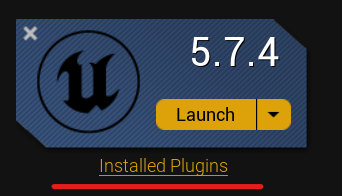
- Va dans Bibliothèque → clique sur Plugins installés sous la version de ton moteur.
- Si une mise à jour est disponible, tu verras un bouton Mise à jour à côté du plugin.
- Clique sur Mise à jour et attends qu’il s’installe.
- Redémarre l’éditeur Unreal.
Mises à jour du contenu du nuage
Certaines choses se mettent à jour automatiquement en arrière-plan - les fichiers d’invite AI, la documentation des outils, les listes de modèles. Tu n’as pas besoin de réinstaller quoi que ce soit pour les obtenir. Ils se synchronisent la prochaine fois que tu démarres l’éditeur avec le plugin chargé.
Tu peux voir la version actuelle de ton plugin (et l’état de la mise à jour du nuage) dans Paramètres → Mises à jour.
Suppression ou réinstallation du plugin
Si quelque chose a mal tourné et que tu veux faire table rase du passé :
Étape 1 - Supprimer du moteur
- Ouvre le Lanceur de jeux d’Epic Games.
- Va dans Bibliothèque → Plugins installés.
- Trouve le plugin en question et clique sur Supprimer.
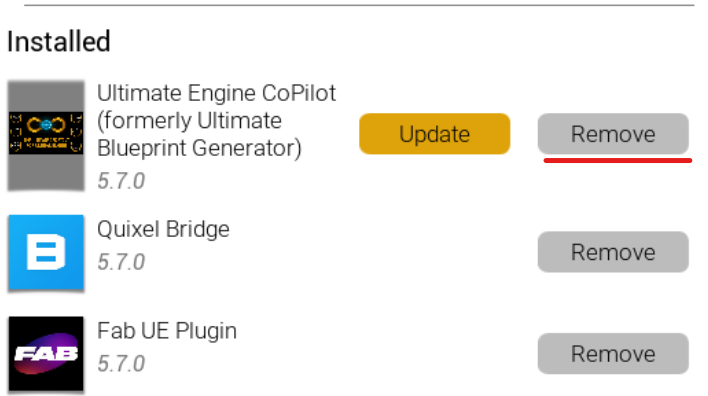
Étape 2 - Supprimer les fichiers restants (chemin d’accès Windows indiqué)
Après la suppression, vérifie qu’il ne reste plus rien. Ouvre l’explorateur de fichiers et va dans :
C:\Program Files\Epic Games\UE_5.X\Engine\Plugins\Marketplace\UltimateBlueprintGeneratorRemplace 5.X par la version de ton moteur. Si le dossier est toujours là, supprime-le.
Attention au nom du dossier: la marque du plugin est Ultimate Engine Co-Pilot, mais sur le disque, le dossier conserve un nom plus ancien (UltimateBlueprintGenerator). C’est intentionnel - si tu renommais le dossier, tu perdrais tes paramètres sauvegardés.
Étape 3 - Réinstallation
Retourne dans ta bibliothèque FAB, trouve le plugin, clique sur Installer sur le moteur, et choisis la version de ton moteur. Tu obtiendras une nouvelle copie.
Ton activation s’applique toujours - tu n’as pas besoin d’entrer à nouveau ta clé de licence ou ton numéro de commande.
Dépannage
La fenêtre d’activation n’apparaît pas. Le plugin n’affiche la fenêtre d’activation que lors du premier lancement après l’activation. Ouvre manuellement la fenêtre du plugin (Fenêtre → Ultimate Engine Co-Pilot) - l’activation apparaîtra dans le panneau Paramètres sous Licence.
La vérification prend plus de 5 minutes. FAB a parfois un délai d’attente. Tu peux garder la fenêtre d’activation ouverte - elle se vérifie automatiquement toutes les 30 secondes. Si 30 minutes s’écoulent sans résultat, vérifie que l’ID de commande et l’email que tu as saisis correspondent exactement à ce qui figure sur ton reçu FAB.
**Le plugin n’apparaît pas dans le menu Plugins Vérifie que tu l’as installé dans la bonne version du moteur. Tu peux l’installer sur plusieurs versions - chaque installation est séparée. Redémarre l’éditeur après l’avoir activé.
**Le palier de départ affiche d’emblée “taux limité” Tu as peut-être utilisé ton allocation de départ dans un autre projet. Elle se réinitialise selon un calendrier affiché dans la zone d’état du plugin. En attendant, connecte ton propre fournisseur d’IA dans Paramètres → Modèles d’IA - voir Fournisseurs d’IA.
Si tu trouves quelque chose qui ne figure pas sur cette liste, la FAQ couvre d’autres cas de figure. Toujours bloqué ? Contacte-nous sur Discord.
Prochaine étape
Maintenant que tu es opérationnel, la suite la plus utile se lit :
- Blueprint Architect - le chat de l’IA en détail, y compris les quatre modes d’interaction (juste discuter, demander avant d’éditer, planifier, éditer automatiquement)
- AI Providers - comment utiliser ta propre clé OpenAI / Claude / Gemini pour une utilisation illimitée
- Project Scanner - indexe l’ensemble de ton projet pour que l’IA puisse raisonner sur tout ce qu’il contient
Bienvenue à bord.