Unreal Engine Blueprint Interface: One Key for a Lamp, a Chest and a Door
How a Blueprint interface works in Unreal Engine: one Interact function, three actors that answer it differently and one F key, built by an AI from one request and tested on all three.

A Blueprint interface in Unreal Engine is a list of function names with no code inside, like a contract. The best way to see why interfaces beat casting is to watch one key work on three very different objects. The caller only says “interact” to whatever is closest, and the object decides what to do.
In this walkthrough, Ultimate Engine CoPilot builds an interactable interface and a lamp, a chest and a door that each answer it differently. You get the exact prompt, a mistake the AI found in its own first build and a plain explanation of why an interface is better than casting.
What the finished system does
A lamp, a chest and a door stand in a row in the snow. You stand next to the lamp and press F, and the light goes off. F again and it comes back. At the chest, F, and the lid swings open and a text says “Gold!”. At the door, F, and it slides open. F again and it slides back. Three very different objects, one key and one idea behind all of them.
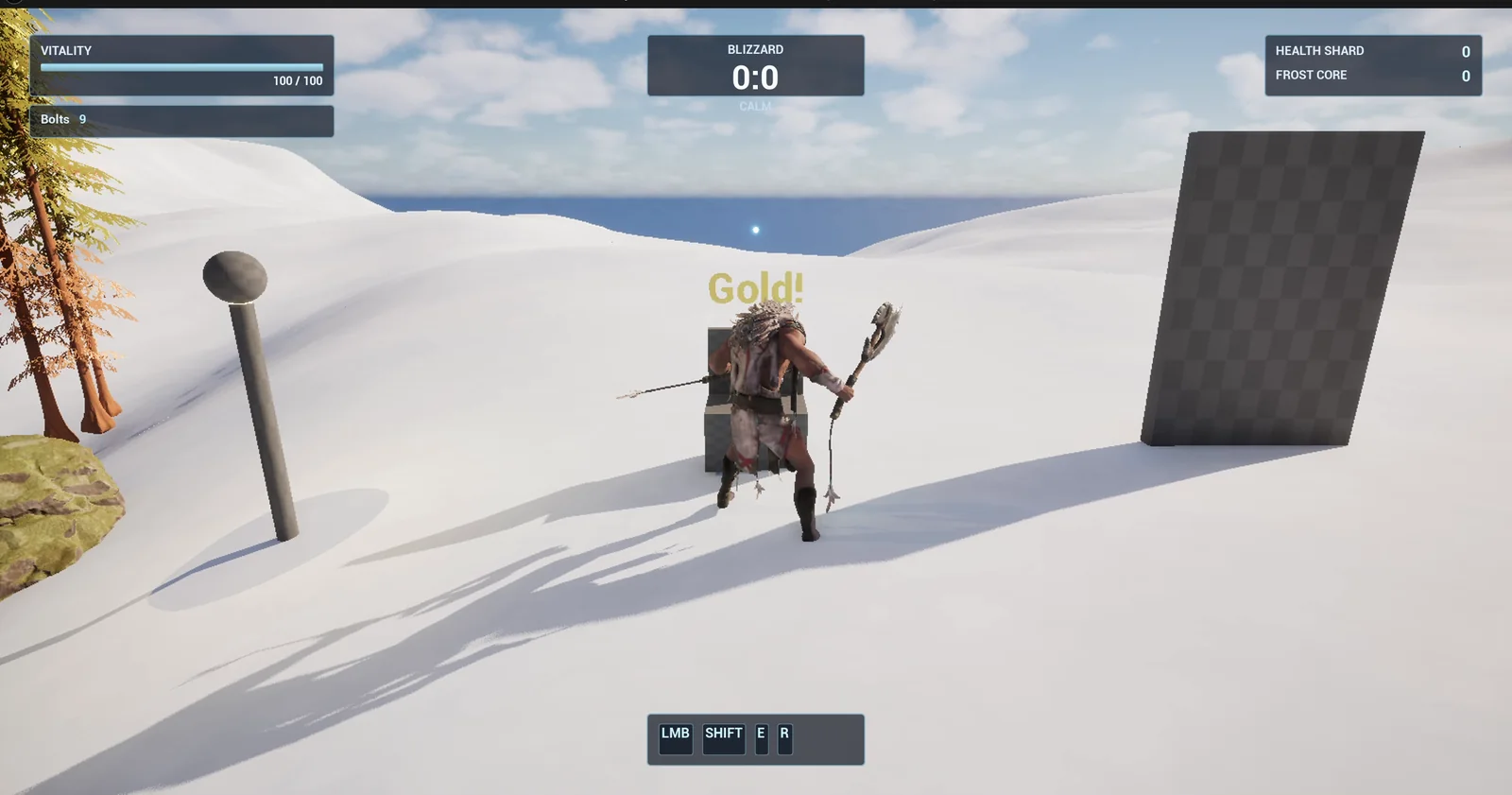
The chest has just been opened, with the lamp on the left and the door on the right.
What an interface is
The controller, the actor that listens for the key, knows nothing about the lamp, the chest or the door. That is the point. The interface, BPI_Interactable, has a single function, Interact. The lamp, the chest and the door each sign the contract and fill in what Interact means for them. The controller only says “interact” to whatever is closest.
The prompt
Copy this, change the objects or the distance, and see what the AI builds:
Make an interaction system with a Blueprint Interface. Create BPI_Interactable in /Game/Series/EP45_Interface with one function, Interact. Create three actors in the same folder that each implement it differently: BP_Lamp, a post with a sphere light that toggles between on (warm yellow) and off every time it is interacted with; BP_Chest, a box with a lid that swings open 90 degrees over 0.5 seconds on the first interact and shows the text Gold! above it for 2 seconds; and BP_Door, a slab 200 wide and 300 high that slides 250 units sideways when interacted with, and slides back on the next interact. Create BP_InteractController, an actor that I place once in the level, that listens for the F key and calls Interact through the interface on the closest actor that implements BPI_Interactable within 300 units of the player, and does nothing if there is none. Keep the 300 distance and the open amounts as variables. Place the lamp, the chest and the door in a row on open snow 700 units east of the player start, 500 units apart. Then play test it: stand next to each one and press F and check the lamp toggles, the chest opens and the door slides, press F far from all three and check nothing happens, and fix anything that does not work.Look at how the request is written. The three objects are described by what they do, not by their class, and the controller is described by what it asks: the closest actor that implements the interface. That is the whole trick of interfaces in one prompt. The last test, far away, checks the case where nothing should happen.
How the AI builds it
The AI first collects what it needs: how interface events work, how to read a key and how to make a timeline. Then five assets appear in the Content Browser: the interface, the lamp, the chest, the door and the controller. Every number from the prompt is a variable: the light intensity, the lid angle, the slide distance and the interaction distance.
Each object gets its own version of Interact. The lamp flips a switch and sets the light. The chest plays a timeline for the lid. The door plays a timeline for the slide.
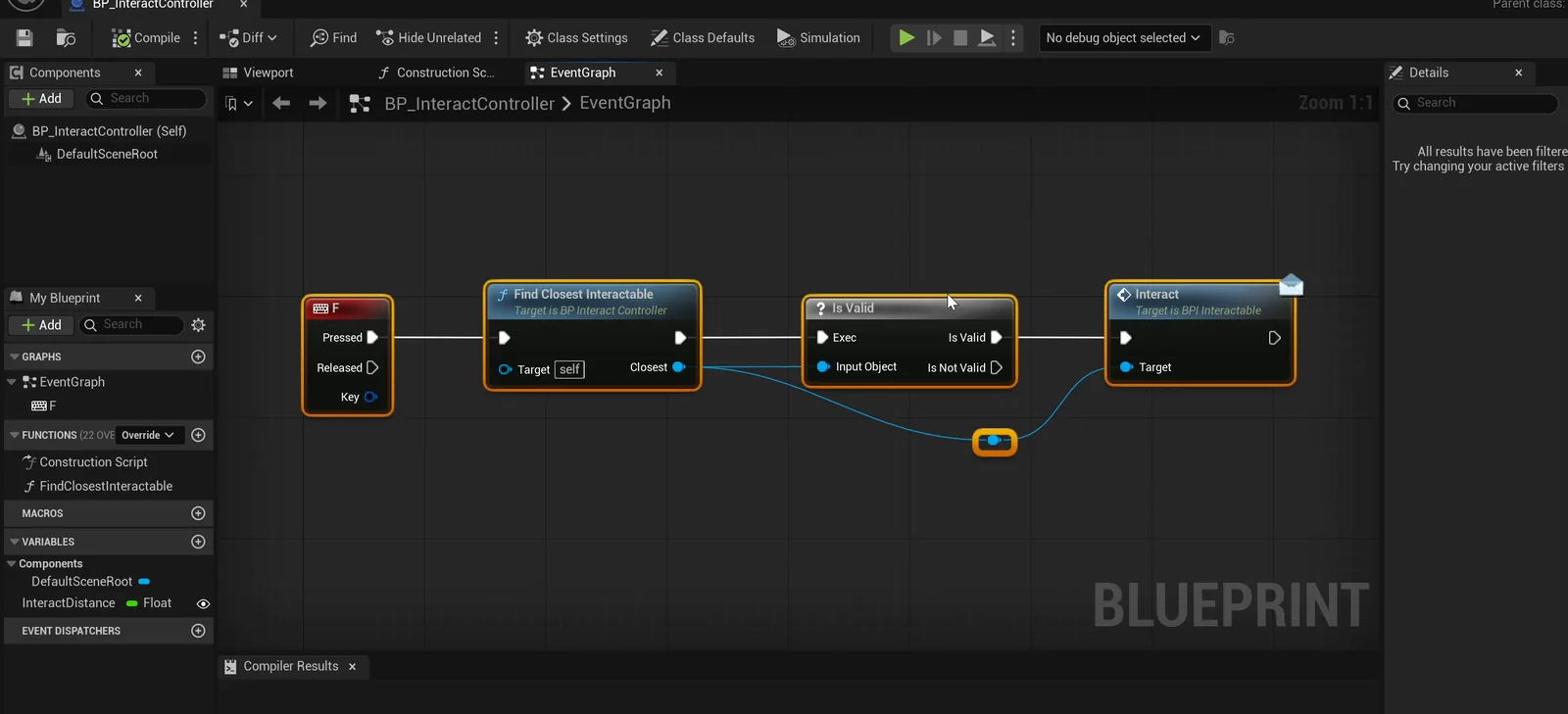
The controller graph: F finds the closest interactable and calls Interact on it.
A mistake in the AI’s own first build
The AI looks at the result and sees that its own first build was wrong. In each Blueprint, the first mesh became a scaled root, which squashed the other parts and made the door slide its own root. It restructured every actor under a plain scene root, placed them again on the snow and only then ran the play test.
The report
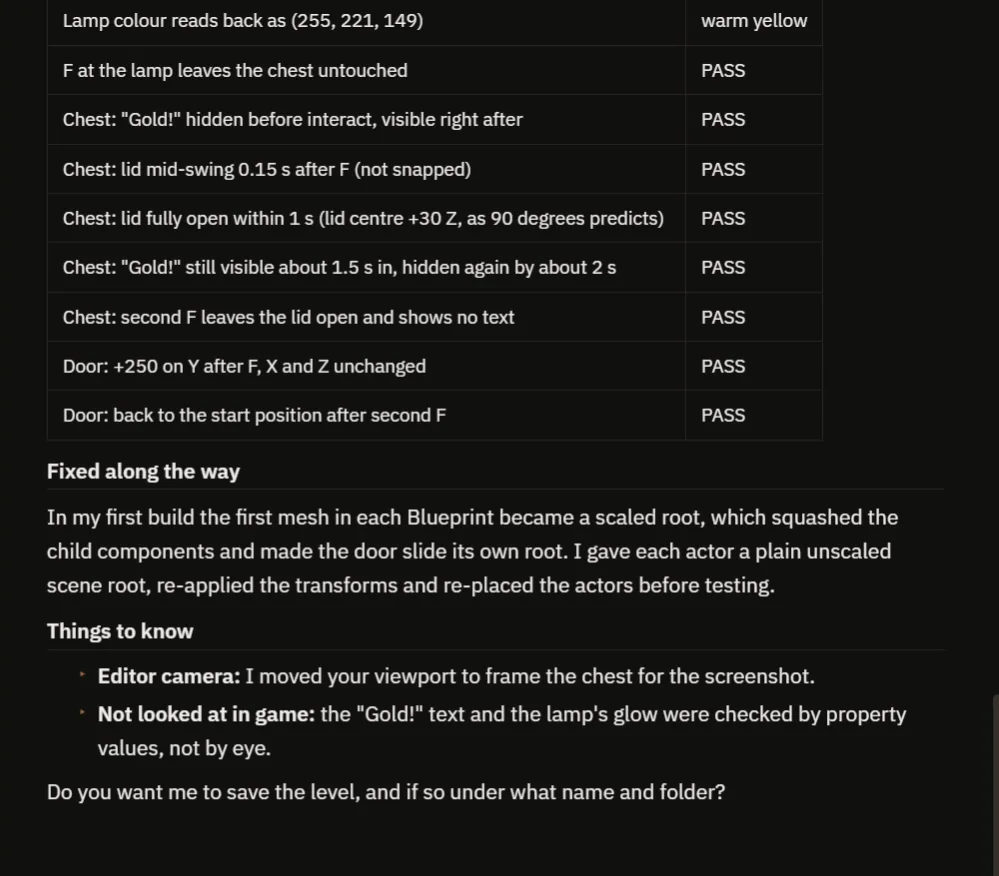
The checks, the fix and the notes.
The report has a table of 19 checks, and all of them pass:
- Far from the objects, F does nothing.
- The lamp goes from 8000 to 0 and back, warm yellow when it is on.
- The chest shows the “Gold!” text, the lid is mid-swing 0.15 seconds after F and fully open within a second. A second F leaves the lid open and shows no text.
- The door moves 250 units on Y, and returns to the start position on the second press.
It is honest about two things. The AI moved the editor camera to frame the chest for the screenshot, and the “Gold!” text and the lamp glow were checked by property values, not by eye. It also put the row in the direction it understood as east, so tell it if you meant another one.
One key, three objects, in plain words
When you press F, the controller looks for the closest actor within 300 units that implements the interactable interface. It does not check whether it is a lamp, a chest or a door. Only whether it signed the contract. Then it calls Interact on that actor. This is a message, not a cast. Each actor runs its own version of the function.
Now think about the alternative. Without an interface, the controller would need a cast to the lamp, a cast to the chest, a cast to the door and a new one for every object you add later. With an interface, you add a new object, give it the function, and the controller works with it without a single change. See Unreal Engine casting explained for what a cast does.
Ideas to extend it
- A prompt that appears over the closest object, “Press F to open”.
- A second interface function, like Inspect, on another key.
- A switch that interacts with the door from far away.
Four tips for interface prompts
- Describe each object by what it does when interacted with.
- Describe the caller by what it asks, not by the class of what it finds.
- Give the distance as a number.
- Ask the AI to test far away, where nothing should happen.
Frequently asked questions
What is a Blueprint interface in Unreal Engine?
A list of function names with no code, like a contract. Any Blueprint can implement it and decide what each function does, and a caller can call the function without knowing the class.
Why use an interface instead of casting?
With casts, the caller needs one cast for every class it can meet. With an interface, you add a new object, give it the function and the caller works with it unchanged.
What happens if nothing implements the interface nearby?
The controller does nothing. The request says so, and the test presses F far from all three objects to check it.
Try it in your project
See what Ultimate Engine CoPilot can build on the product page, or get it on Fab. See how the AI Blueprint generator works.
More builds from this series: the Unreal Engine casting explained, the Unreal Engine interaction prompt and the Unreal Engine event dispatcher.