Unreal Engine Event Dispatcher: One Button, a Door and a Lamp With AI
How an Unreal Engine event dispatcher works: a floor button announces OnPressed, and a door and a lamp bind to it and react, built and tested by an AI from one request.

An event dispatcher in Unreal Engine is a megaphone that an actor owns. When something happens, the actor calls the dispatcher, and every actor that has bound itself to it runs its own event. The owner never needs to know who is listening, or how many. The clearest way to understand one is to watch a single button trigger two different actors.
In this walkthrough, Ultimate Engine CoPilot builds a floor button with two dispatchers, and a door and a lamp that bind to them. You get the exact prompt, two problems the AI found and fixed and a plain explanation of how a dispatcher works.
What the finished demo does
A floor button, a tall door and a lamp. You stand on the button and the door slides up, and at the same moment the lamp turns blue and starts to pulse. You step off, the door slides back down and the lamp goes dark. The button does not know about the door, and it does not know about the lamp. It just announces “I was pressed”, and whoever is listening reacts.
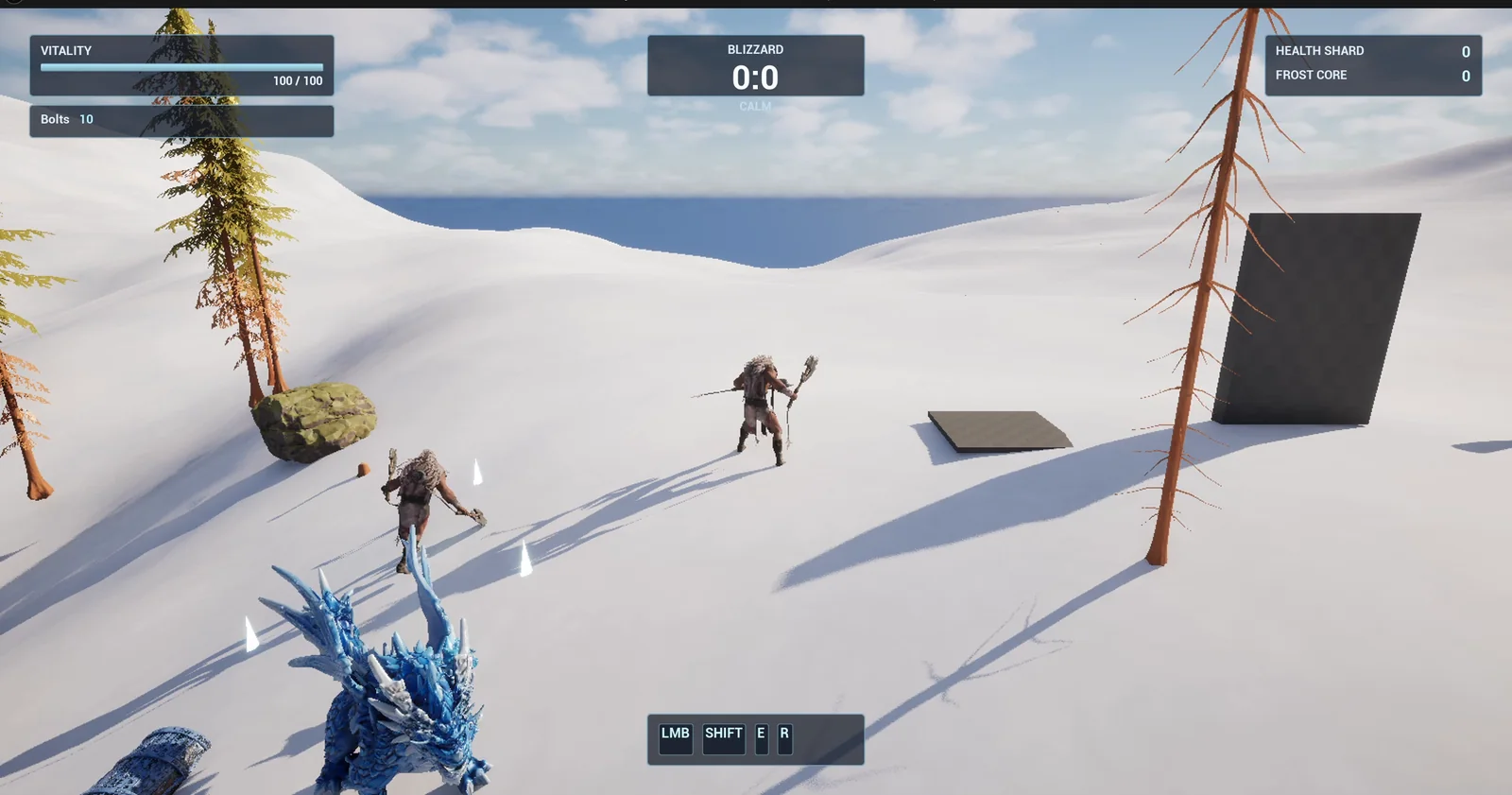
The button on the ground and the door slab behind it, before anyone stands on the plate.
The prompt
Copy this, change the reactions or the numbers, and see what the AI builds:
Make an event dispatcher demo with a floor button. Create BP_FloorButton in /Game/Series/EP46_Dispatcher, a flat square plate 200 units wide that sinks 8 units when the player stands on it and rises again when the player leaves. It has an event dispatcher called OnPressed that it calls each time the player steps on it, and OnReleased when the player steps off. Create BP_ReactiveDoor in the same folder, a slab 250 wide and 350 high with an exposed variable Button of type BP_FloorButton; on BeginPlay it binds to the button's OnPressed so it slides up 350 units over 1 second, and binds to OnReleased so it slides back down. Create BP_ReactiveLamp, a pillar with a sphere light, with the same Button variable; on OnPressed it turns bright blue and pulses its light, on OnReleased it turns off. Keep the slide height and time as variables. Place one button, one door and one lamp on open snow 700 units east of the player start, 500 units apart, and set each Button variable to that button. Then play test it: teleport the player onto the button and check the door opens and the lamp turns blue, step off and check the door closes and the lamp goes dark, and fix anything that does not work.Look at who is named in the request. The button is described by what it announces, not by what it controls. The door and the lamp are described by what they listen to. If you wanted a third reaction later, a sound or a second door, you would only add a listener and never touch the button.
How the AI builds it
The AI starts with a plan: the button first, with its two dispatchers, then the two listeners. Then the assets appear in the Content Browser: the button, the door, the lamp and a small glow material that the AI added so the bulb itself lights up, not only the light.
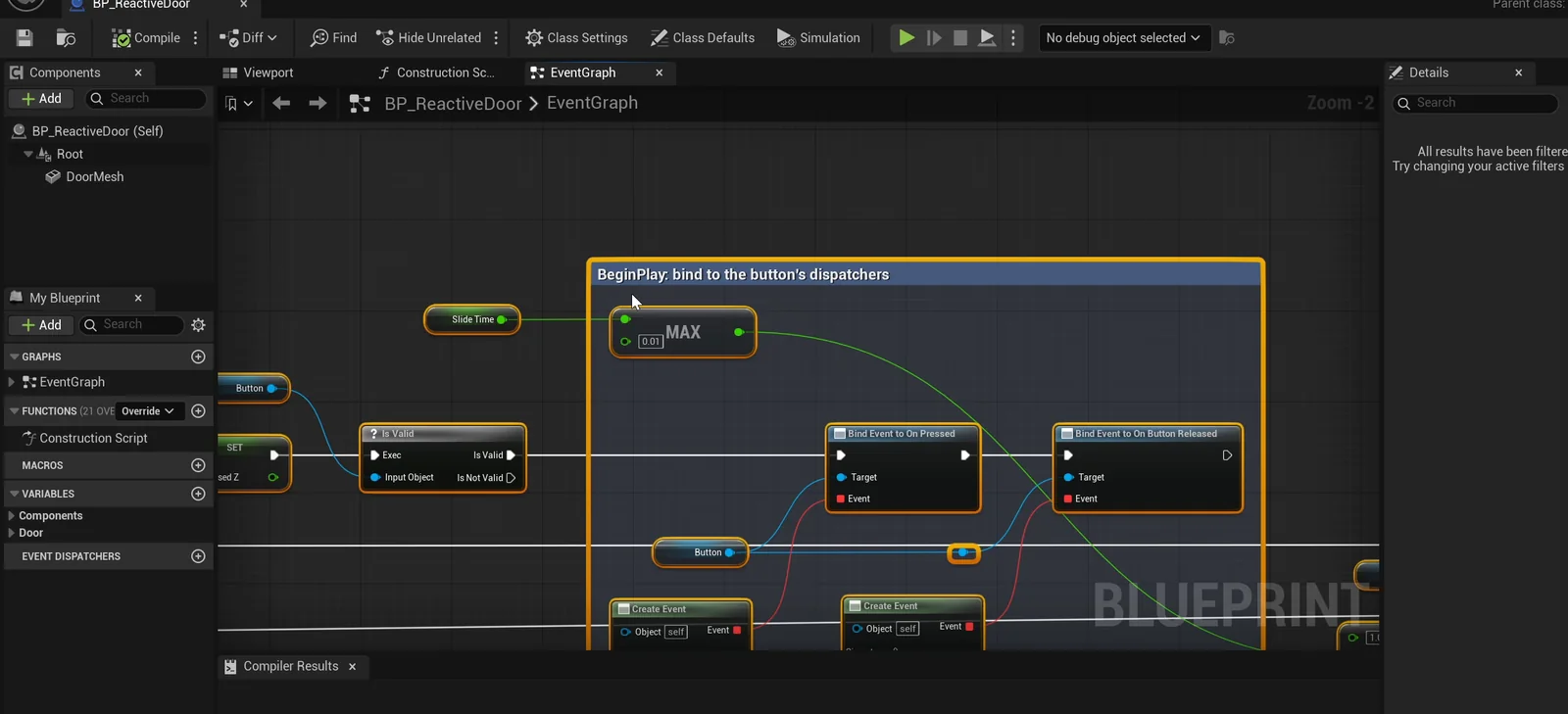
The door graph: on BeginPlay it binds to the button’s dispatchers.
Two problems the AI fixed
- The first version used automatic events. The door and the lamp first used events that were bound automatically. But the request said “bind on BeginPlay”, so the AI swapped them for real Bind nodes, one for pressed and one for released. That is exactly what makes it a dispatcher.
- The lamp held steady instead of pulsing. The timeline’s loop setting did not stick, so the AI made the pulse restart itself every time it finishes, and tested again.
The AI also explains a name. The release dispatcher is called OnButtonReleased, not OnReleased, because every actor in Unreal already has a built-in event with that name.
The report
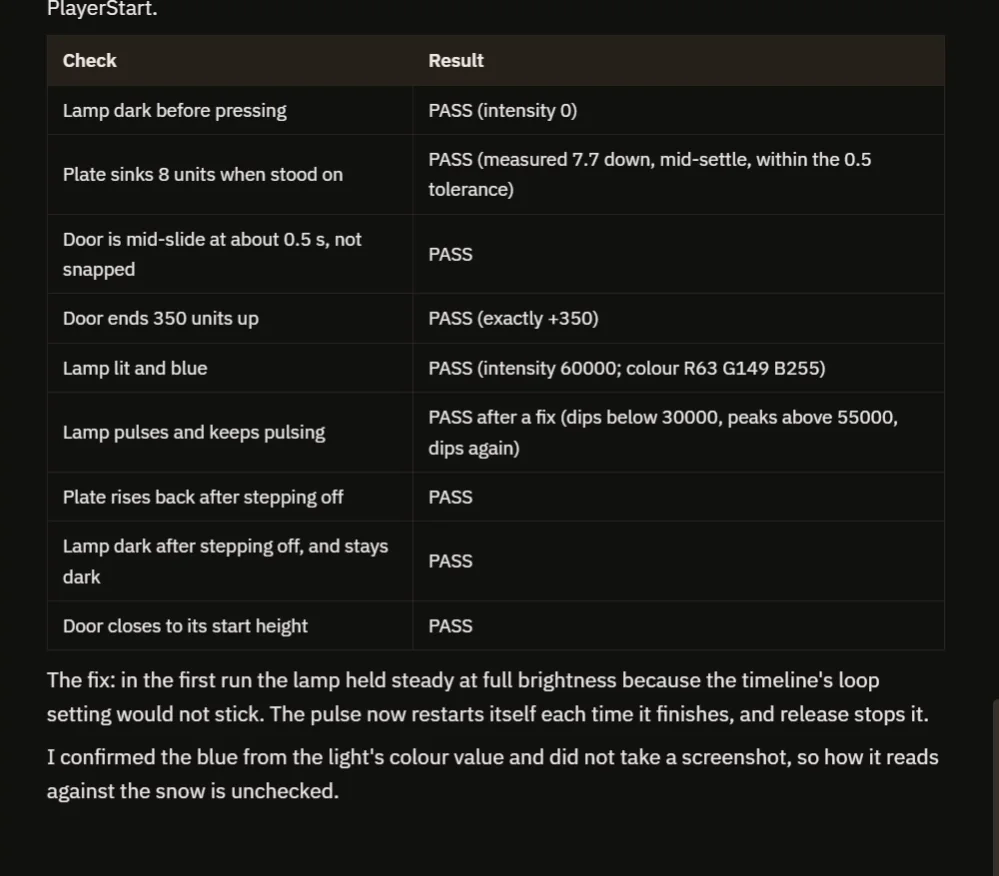
Nine checks pass, and the fix is explained.
The report has a table of nine checks:
- The lamp is dark before the press, with intensity 0.
- The plate sinks 7.7 units, within the tolerance.
- The door is mid-slide at about 0.5 seconds, and ends exactly 350 units up.
- The lamp lights blue (intensity 60000, colour R63 G149 B255) and keeps pulsing, dipping below 30000 and peaking above 55000.
- After stepping off, the plate rises, the lamp goes dark and stays dark, and the door closes.
It is honest about what it did not see: it confirmed the blue from the light’s color value and did not take a screenshot, so how it reads against the snow was unchecked. That is why the video also shows a real run.
How an event dispatcher works, in plain words
On BeginPlay, the door takes its Button variable and tells it: when you are pressed, run my handle pressed event, and when you are released, run my handle released event. That is the Bind node. It happens once, at the start.
Later, when the player stands on the button, the button calls its dispatcher. The engine runs every event that was bound to it. In the door, that event plays the slide timeline forward. In the lamp, it starts the pulse. If the door did not exist, the button would still work, and nothing would break. Because the slide height and the slide time are variables, you can make a heavy gate or a quick trapdoor with two numbers.
Ideas to extend it
- A second door that opens when the button is pressed and stays open.
- A sound that plays on the pressed dispatcher.
- A button that needs a weight on it, a crate, instead of the player.
Four tips for dispatcher prompts
- Name the dispatchers and say when they are called.
- Describe the listeners by what they bind to, and when they bind.
- Give the numbers for every reaction.
- Ask the AI to test both the press and the release.
Frequently asked questions
What is an event dispatcher in Unreal Engine?
A dispatcher is an event that an actor owns. Other actors bind their own events to it, and when the owner calls the dispatcher, every bound event runs.
What is the difference between a dispatcher and an interface?
With a dispatcher, the owner announces something and listeners react without the owner knowing them. With an interface, a caller sends a message to a specific actor that implements a function.
Why is the release dispatcher called OnButtonReleased?
Every actor already has a built-in event called OnReleased, so the AI chose a different name to avoid a clash.
Try it in your project
See what Ultimate Engine CoPilot can build on the product page, or get it on Fab. See how the AI Blueprint generator works.
More builds from this series: the Unreal Engine Blueprint interface, the Unreal Engine pressure plate and the Unreal Engine lever and bridge.