Unreal Engine Game Mode vs Game State: Build an Orb Game With AI
Unreal Engine Game Mode vs Game State explained with a small game: the game mode holds the rules, the game state holds the score, and five orbs end in You win, built by an AI.

In Unreal Engine, the game mode is the referee and the game state is the scoreboard. The game mode holds the rules of a level: which pawn you play, which game state is used and when you win. The game state holds what is true right now and what everyone should know, such as a score. The clearest way to learn the difference is to watch a small game use both.
In this walkthrough, Ultimate Engine CoPilot builds a game mode with the rules, a game state with the score, gold orbs and a counter that ends in a “You win!” message. You get the exact prompt, the checks the AI ran and a plain explanation of why Unreal keeps the two apart.
What the finished game does
A ring of gold orbs in the snow. You touch one and a counter at the top says “Orbs 1/5”. Another, 2 of 5. Three, four, and when you take the fifth, a big message appears in the middle of the screen: “You win!”. The orb does not count anything by itself, and neither does the counter. The rule lives in one place, the game mode, and the score lives in another, the game state.
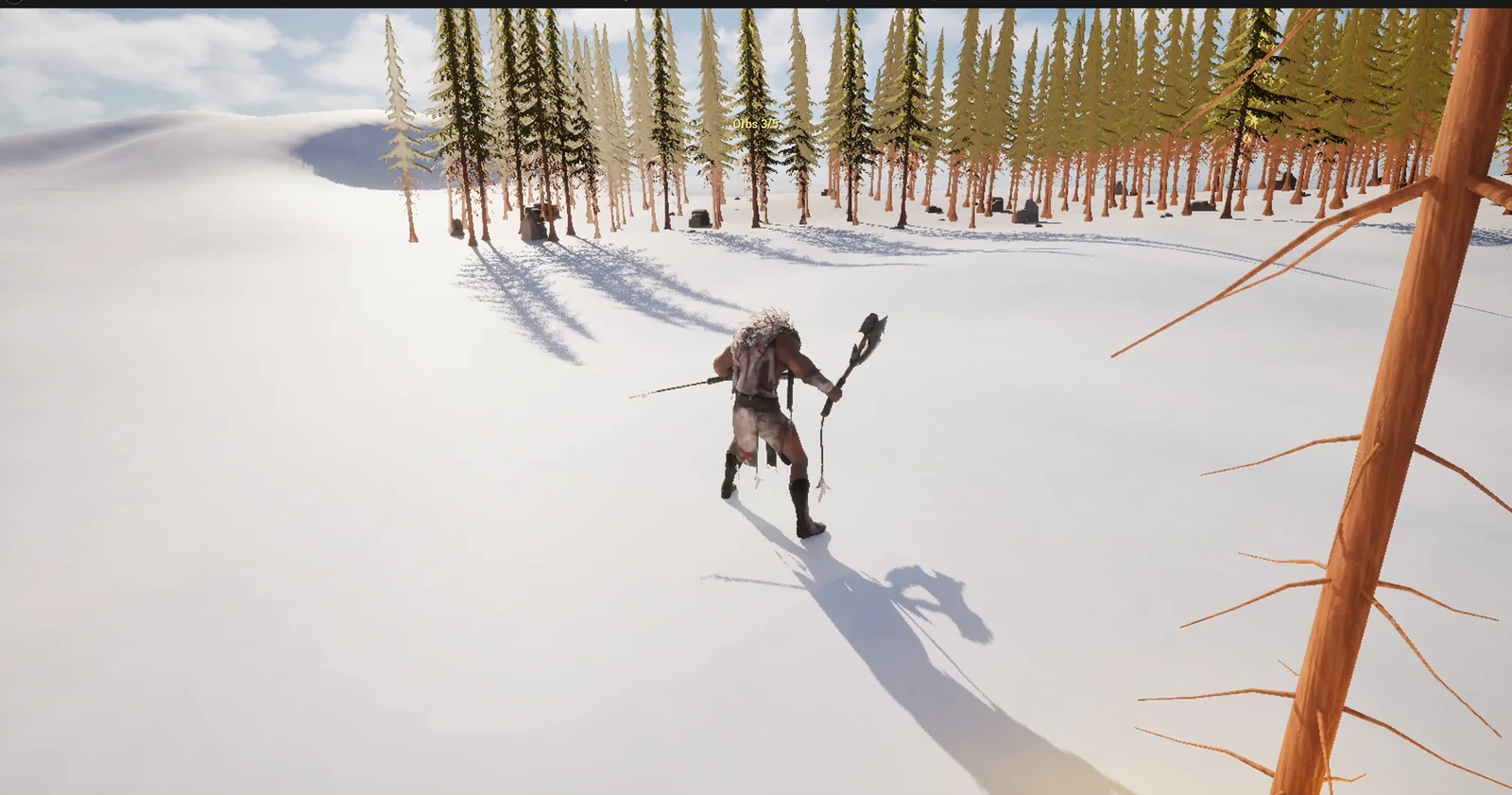
The player in the snow before the first orb. The orb ring is east of the player start.
Game mode and game state
The game mode is a Blueprint with no mesh and no position, nothing to see. It is pure rules. When the level starts, the engine creates one game mode, only on the server. The game state is the other half, the scoreboard. It is replicated, so in a multiplayer game every player can read it. The game mode is the only one that is allowed to change it.
A simple way to remember it: rules and decisions in the game mode, shared facts in the game state.
The prompt
Copy this, change the goal or the rules, and see what the AI builds:
Make an orb collecting game that shows the difference between GameMode and GameState. In /Game/Series/EP49_GameRules create BP_OrbGameMode, which holds the rule: the game is won when 5 orbs are collected, with the default pawn kept as KhaimeraPlayerCharacter, and BP_OrbGameState, which holds the shared state: an integer Score. Create BP_Orb, a glowing gold sphere 60 units across that floats and spins and, when the player touches it, tells the game mode to add 1 to the score in the game state and then destroys itself. Create WBP_OrbHUD, a text at the top centre at y=150 to 170 on a 1920x1080 layout, clear of the existing Blizzard box, reading Orbs 0/5 that follows the Score in the game state, and a large centred message You win! that shows only when the game mode declares the win. Set BP_OrbGameMode as the GameMode Override of the current level in World Settings. Keep the goal of 5 as a variable of the game mode. Place 6 orbs on open snow east of the player start, in a ring of radius 500 around a point 700 units east. Then play test it: teleport the player to each orb in turn, check the text counts up, check You win! appears at 5, and fix anything that does not work.Look at who does what in this prompt. The orb tells the game mode, not the game state. The game mode decides: five reached, win. And the display only reads. Rules in one place, data in another, display reading both. That is the clean way to build any game.
How the AI builds it
The AI starts with the assets: the game mode, the game state, the orb, the display and a gold material. The goal of 5 is a variable on the game mode, so you can change the rule without touching the logic.
The game mode gets a function, AddScore. It adds to the score in the game state, then checks whether the goal is reached, and if so shows the win message. It also creates the display when the game begins. The orb only calls AddScore on the game mode when the player touches it.
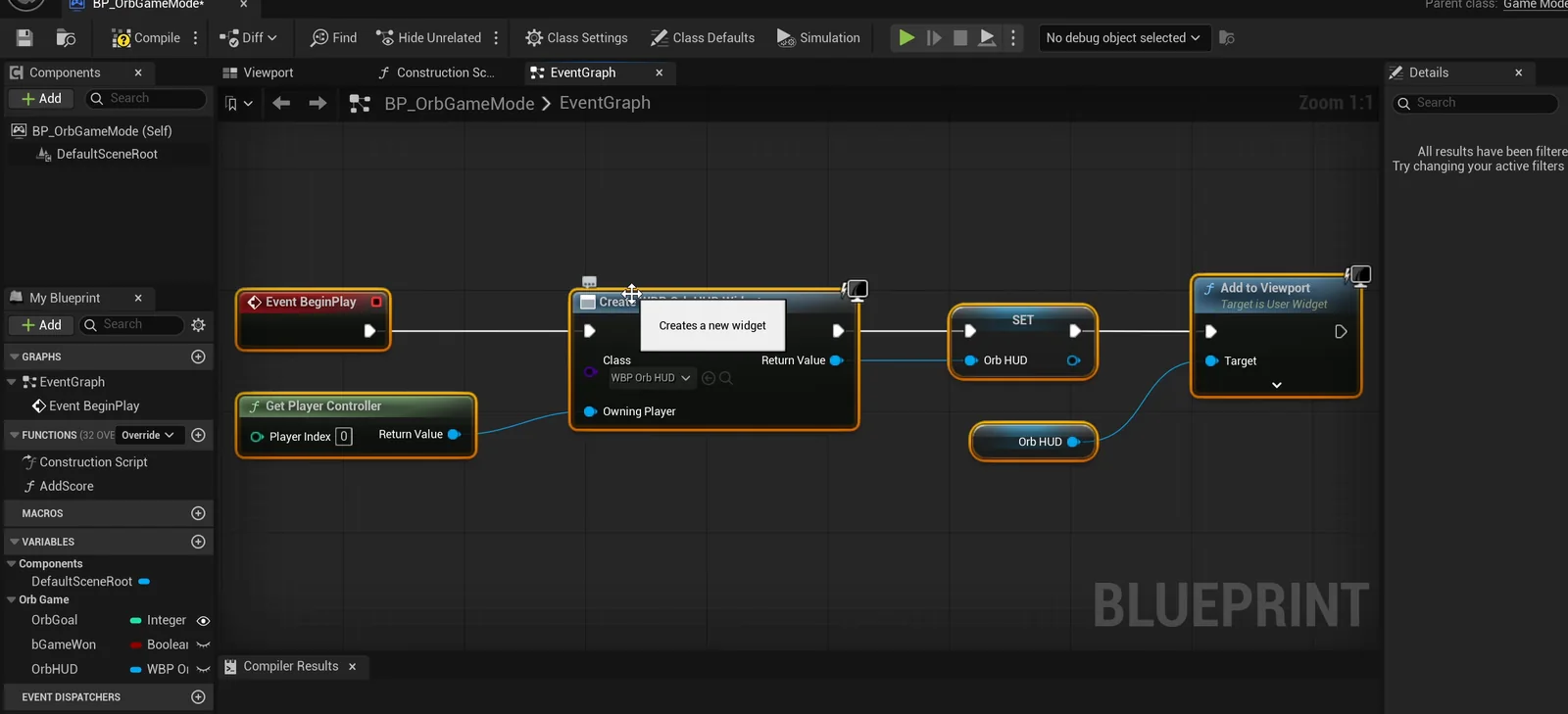
The game mode graph: on BeginPlay it creates the HUD widget and adds it to the viewport.
Then the placement: six orbs in a ring around a point in the snow, snapped to the ground and raised to chest height so the player can touch them. The play test passes at the first try, with nothing to fix.
The report
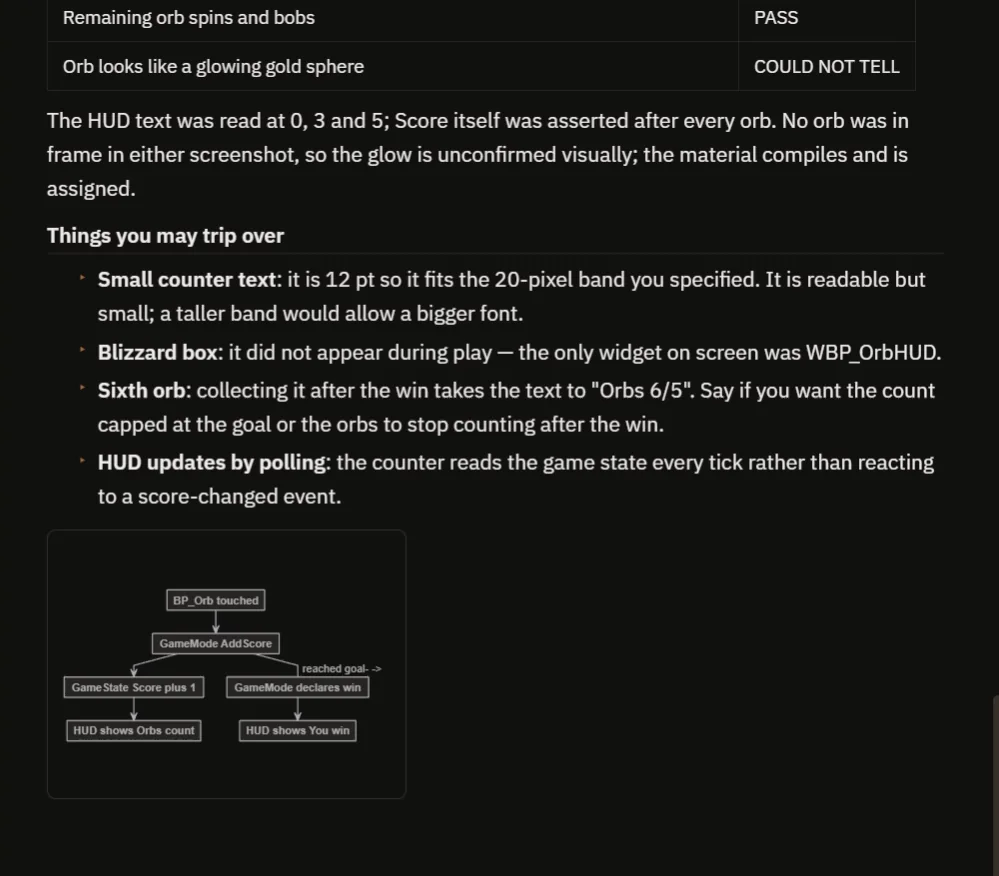
The notes, and the flow diagram the AI drew.
At the start, the score is 0, the text says “Orbs 0/5”, the win message is hidden and the pawn is the player character. After the first three orbs, the score is 3 and the collected orbs are gone. After the fifth, the score is 5 and the win message is on the screen, confirmed in a screenshot. The remaining orb still spins and bobs. The one thing the AI could not tell is whether the orb looks like a glowing gold sphere, because no orb was in frame in either screenshot.
It is honest about the small things you may trip over:
- The counter text is 12 pt, because it has to fit the narrow 20 pixel band you asked for. It is readable but small.
- The Blizzard box did not appear during play. The only widget on screen was WBP_OrbHUD.
- A sixth orb, collected after the win, takes the text to “Orbs 6/5”. Cap the count, or have the orbs stop counting after the win, if you do not want that.
- The display reads the score every frame instead of reacting to a change.
That is why the video also shows a real run.
How it works, in plain words
When an orb calls AddScore, the game mode adds one and asks: did we reach the goal? The score itself is not stored in the game mode. It is in the game state, because the game state is replicated, so in a multiplayer game every player can see it. In the game mode you put the rules, like how to win, how to respawn and how many players.
Because the goal is a variable, you can make the same game with ten orbs or three in a few seconds.
Ideas to extend it
- A timer in the game state, and a lose rule in the game mode when it reaches zero.
- A second team score.
- Orbs that respawn after a delay.
Four tips for game rule prompts
- Say what the game mode decides, in plain rules.
- Say what the game state stores, only shared facts.
- Make the actors talk to the game mode, never to each other.
- Ask the AI to test every step of the count, and the win.
Frequently asked questions
What is the difference between Game Mode and Game State in Unreal Engine?
The game mode holds the rules and exists only on the server. The game state holds shared facts, like a score, and is replicated so every player can read it.
Where should the score live?
In the game state, because it is replicated. The game mode is the only one that changes it, and the HUD only reads it.
How do I set the game mode for a level?
Use the GameMode Override in the level’s World Settings. In this build, BP_OrbGameMode is set as the override of the current level.
Try it in your project
See what Ultimate Engine CoPilot can build on the product page, or get it on Fab. See how the AI Blueprint generator works.
More builds from this series: the Unreal Engine coin collection, the Unreal Engine save game system and the Unreal Engine main menu.