Unreal Engine Turret: Build a Tracking Turret That Fires With AI
How to build an Unreal Engine tracking turret: range and line of sight, a head that turns at 120 degrees per second and a shot every second with a warning tip, built and tested by an AI.

A tracking turret in Unreal Engine is three ideas: a range check, which asks whether the player is close enough and whether the turret can see them; a turn, which rotates the head toward the player at a limited speed; and a timer, which fires one shot every second. The easiest way to build one is to give an AI the range, the turn speed and the fire rate in a single request.
In this walkthrough, Ultimate Engine CoPilot builds a tracking turret that turns toward the player in line of sight, warns with a glowing tip and fires glowing shots once a second. You get the exact prompt, one test that failed because of the test and not the turret, and a plain explanation of how a tracking turret works.
What the finished turret does
A turret stands in the snow: a dark base, a round head and a barrel with a glowing tip. When you are far away, it does nothing. When you come within 1200 units, the head turns smoothly toward you, the tip glows as a warning and a glowing shot flies out, one every second. The shot disappears with a flash when it hits. When you leave, the turret stops, and the head slowly turns back to the front.
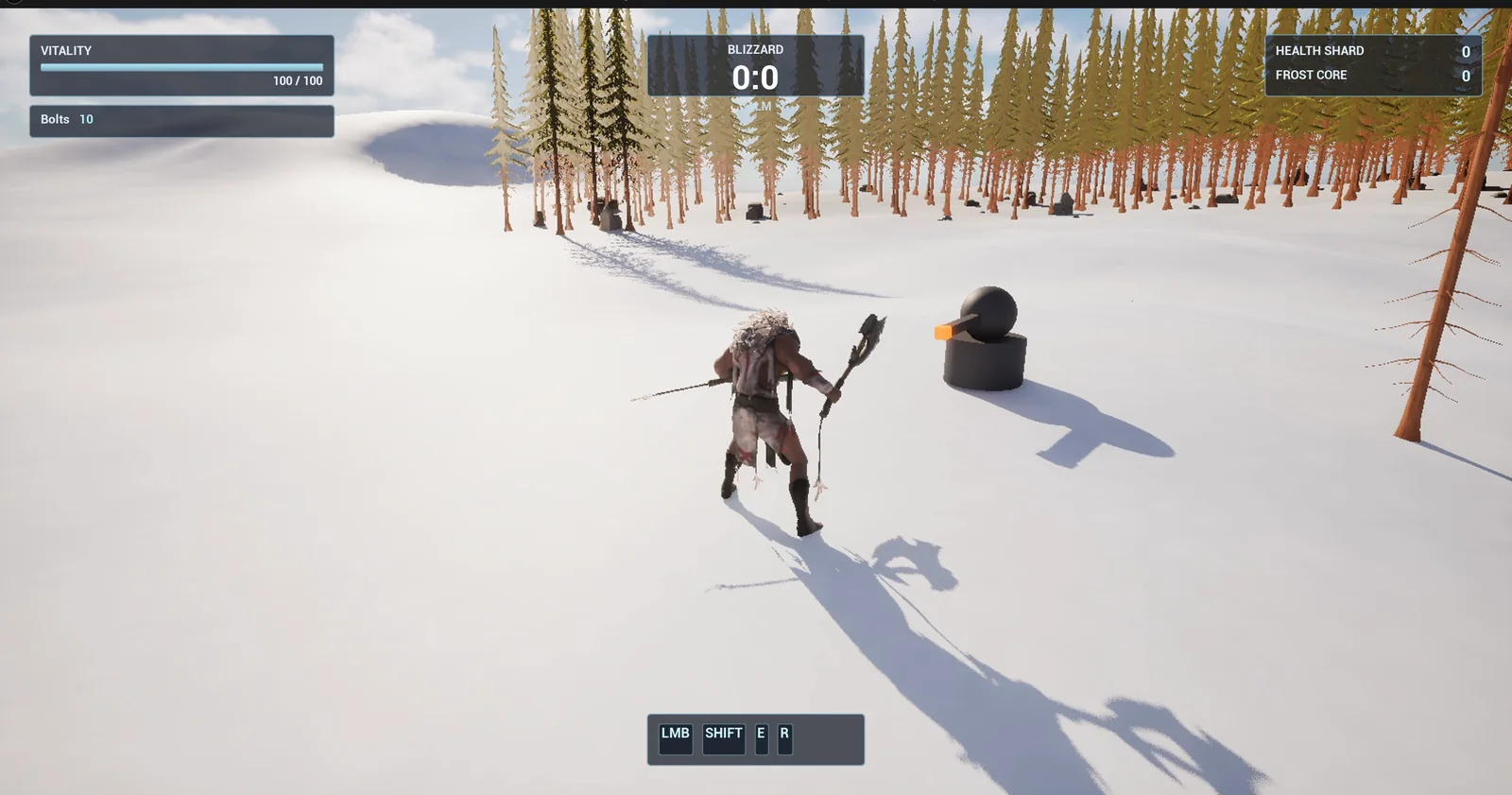
The turret on the snow, with the orange barrel tip.
The prompt
Copy this, change the range or the fire rate, and see what the AI builds:
Make a tracking turret. Create BP_Turret in /Game/Series/EP57_Turret, built from a cylinder base 100 units wide, a sphere head and a long thin cube barrel, in dark grey with an orange barrel tip. While the player is within 1,200 units and in line of sight, the head rotates smoothly toward the player at 120 degrees per second, and every 1 second it fires a BP_TurretShot from the barrel tip. Create BP_TurretShot in the same folder, a glowing orange sphere 30 units wide that flies straight at 1,500 units per second, is destroyed after 2 seconds, and is destroyed at once with a small flash (a bright sphere that grows and fades in 0.2 seconds) when it hits the player or a wall. When the player is outside 1,200 units the head slowly returns to face forward and the turret stops firing. The barrel tip turns red 0.3 seconds before each shot. Keep the range, the fire interval, the turn speed and the shot speed as variables. Place the turret on the open snow about 900 units east of the player start. Then play test it: stand outside 1,200 units and check no shots are fired, teleport inside the range and check the head turns toward the player, check one shot spawns each second, check shots disappear on hit and after 2 seconds, leave the range and check firing stops, and fix anything that does not work.Look at the words “in line of sight”. A turret that shoots through walls feels cheap. And look at the last test, leaving again: a good turret has a state for when there is nothing to shoot at, not only for when there is.
How the AI builds it
The AI starts by mapping out the pieces, and creating the materials for the dark body, the tip and the shots. They appear in the Content Browser: the turret, the shot, a flash that the AI adds so the shot can disappear at once, and four materials. Two extra variables appear too, the return speed and the warning time.
The AI had a small problem: the tool wanted each node to have an index, so it resubmitted all four graphs and then continued. Look at the finished graph. It is almost empty: one event, Tick, and one call, Update Turret. The whole turret lives inside that one function.
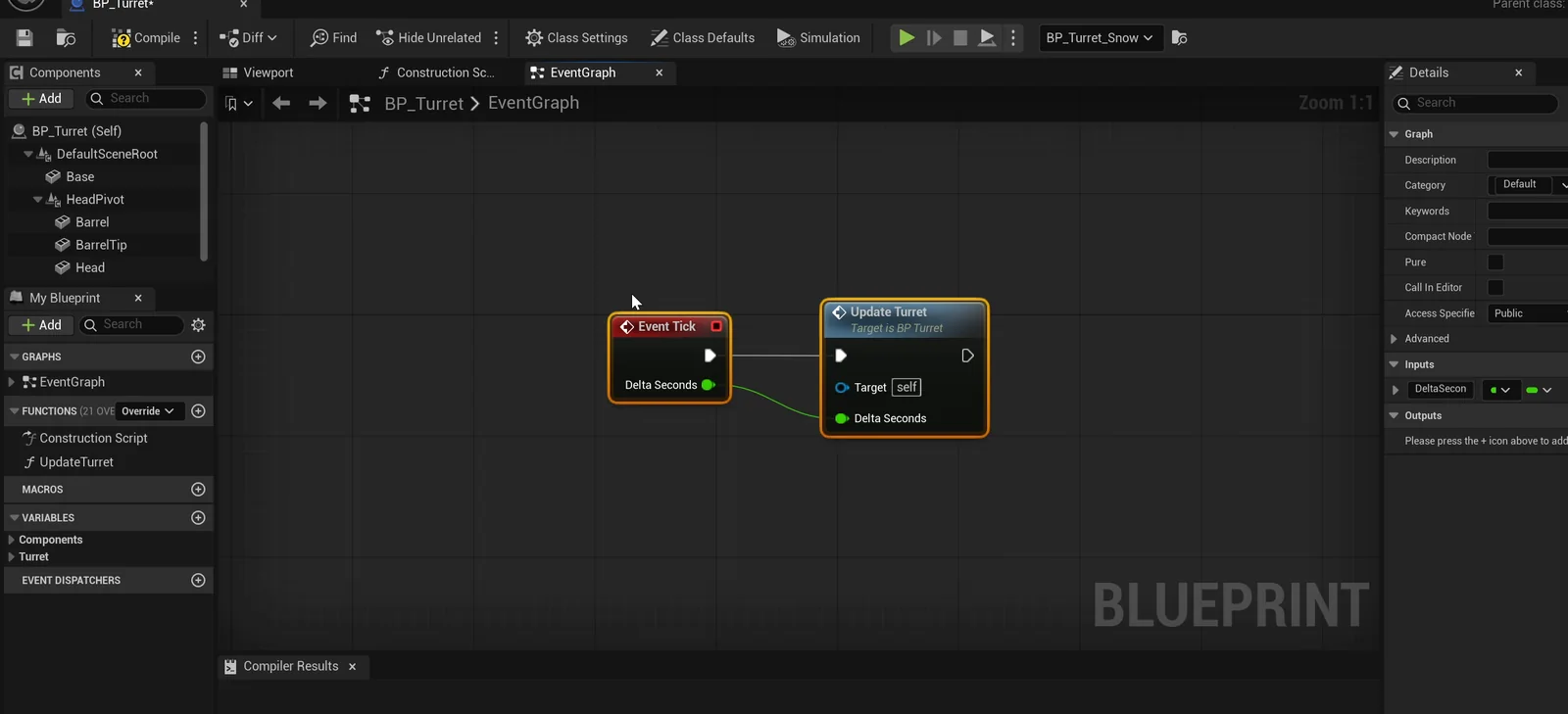
The turret graph: Tick calls Update Turret, and the whole behavior lives in that function.
The play test
Nine checks pass:
- Outside the range, at 1,500 units for 2.5 seconds, no shots.
- Entering the range, the head is mid-turn at 0.3 seconds and aimed at the player after about 0.75 seconds.
- One shot per second: none at 0.5 seconds, then one at about 1, 2 and 3 seconds.
- Shot speed is 1500.
- A shot is destroyed on hitting the player, and on hitting the ground, where a flash spawns at the impact point and then is gone.
- A shot that hits nothing is alive at 1.5 seconds and gone by 2.4 seconds.
- Leaving the range, the shot count stays unchanged for 2.6 seconds and the head goes back to yaw 0.
A failure that was the test’s fault
The first run reported five failed shot count checks. The AI explained that it was the test, not the turret. The turret had already fired 10 shots at the spawn point before the sequence started, and the test compared against zero. The AI captured a baseline, ran again, and everything passed with no fixes to the Blueprints.
The report
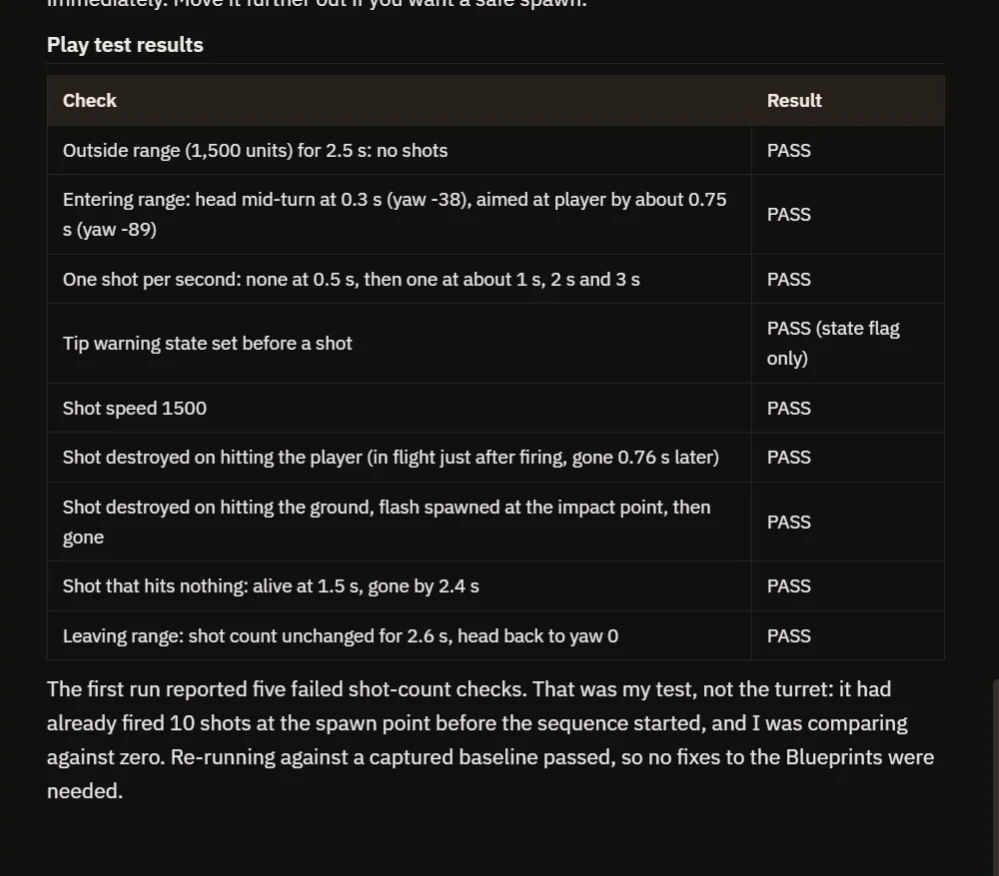
The nine results, and the first run’s failed counts explained.
The report also says what to know:
- Line of sight is a trace, so a hidden player counts as out of range.
- The player spawns inside the range, because the turret is 900 units from the start, so you may want to move it.
- The tip warning was verified as a state flag only. The looks, the colors, the glow and the red tip, were not checked by eye.
That is why the video also shows a real run: the head follows you to the other side, and slowly turns back when you leave.
How a tracking turret works, in plain words
On every tick, the turret measures the distance to the player, and does a trace from the head to the player to see if anything is in the way. If the player is close and visible, it computes the direction to the player and turns the head toward it at the turn speed, never faster. A timer counts the interval. When it ends, the turret first lights the tip for the warning time, and then spawns a shot at the barrel, with the speed in the forward direction. The shot destroys itself on a hit and spawns the flash. If the player is gone, the head turns slowly back to the front.
Because the range, the interval and the speeds are variables, you can make a lazy sentry or a deadly gun with four numbers.
Ideas to extend it
- Shots that push the player back.
- A turret that has health, and explodes.
- A second turret that predicts where the player is going.
Four tips for turret prompts
- Give the range, the interval and the speeds as numbers.
- Say “line of sight”.
- Say what the turret does when there is no target.
- Ask the AI to test outside, inside and leaving.
Frequently asked questions
How do I make a turret that tracks the player in Unreal Engine 5?
Each tick, check the distance and a line trace to the player. If visible, rotate the head toward them at a limited turn speed and fire on a timer.
How do I stop a turret shooting through walls?
Do a trace from the turret to the player and only count the player as a target if nothing blocks it. Say “in line of sight” in the request.
Why did the first run report failed shot counts?
The turret had already fired 10 shots at the spawn point before the test sequence started, and the test compared against zero. A captured baseline fixed the test, not the Blueprints.
Try it in your project
See what Ultimate Engine CoPilot can build on the product page, or get it on Fab. See how the AI Blueprint generator works.
More builds from this series: the Unreal Engine stealth sentry, the Unreal Engine ranged weapon and the Unreal Engine wave spawner.