Unreal Engine Ranged Weapon: Build an Ice Bolt Projectile With a Throw Animation
How to build an Unreal Engine ranged weapon: an ice bolt on the F key that spawns from the hand 0.3 seconds into a throw animation, damages enemies and refills a bolt counter.

A ranged weapon in Unreal Engine has four parts: an input, an animation, a projectile and a resource. The detail that makes it feel right is the timing. The projectile must not leave at the moment you press the key. It must leave when the hand moves, a little later.
In this walkthrough, Ultimate Engine CoPilot builds an ice bolt on the F key. The player plays the Paragon throw animation, the bolt spawns from the right hand 0.3 seconds into the throw, it damages the training brutes from the last episode and a counter of bolts refills. You get the prompt, how the AI proved the delay and the notes it reported.
What the finished weapon does
You walk toward three warriors and press F. Your character plays a real throw animation, and a moment later a glowing blue ice bolt leaves his hand and flies at a warrior. The warrior’s health bar drops and he reacts. The bolt counter on the screen goes down, and fills up again.
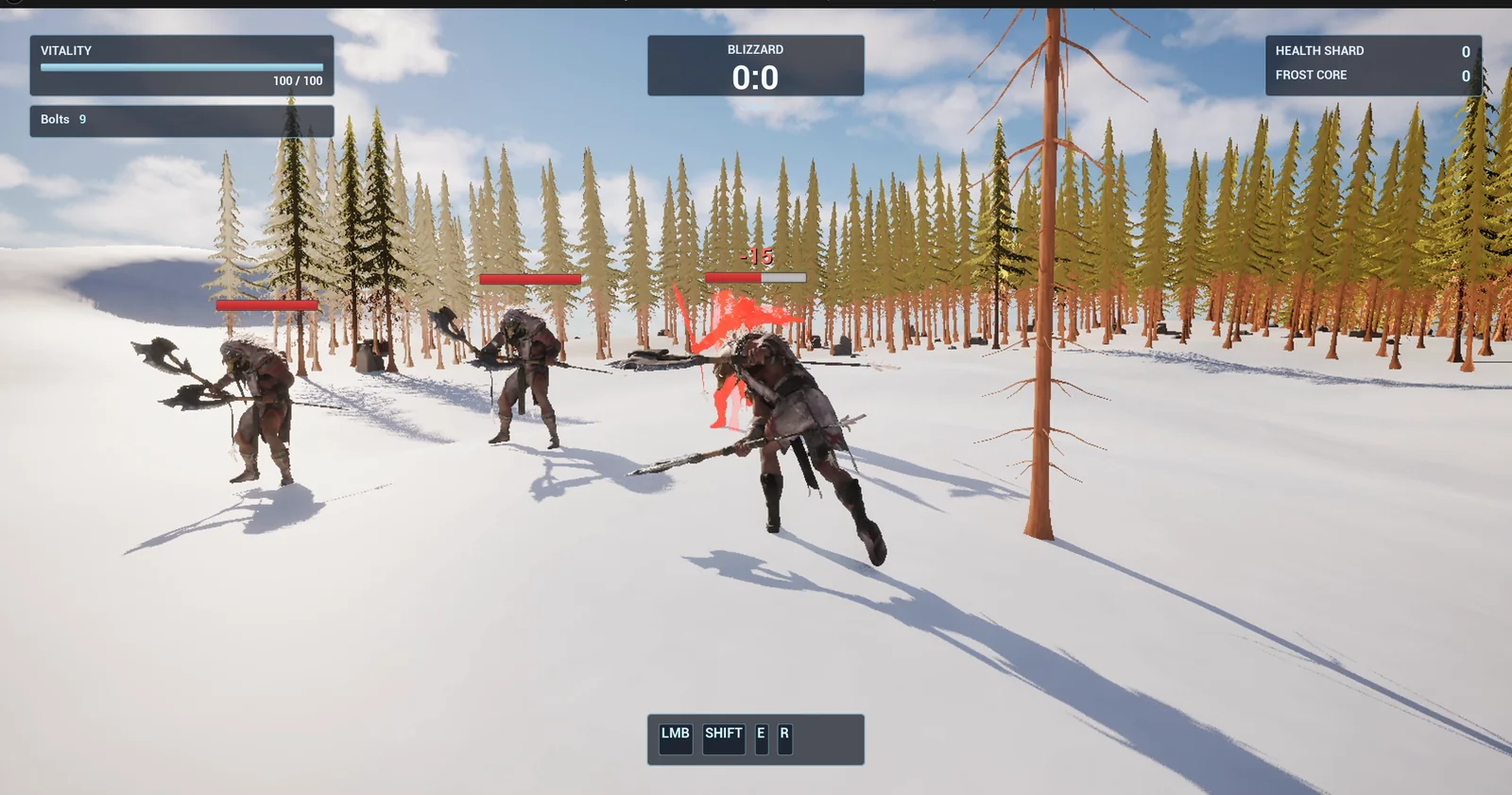
A brute flashes red after a hit, and the Bolts counter in the top left has dropped to 9.
The prompt
Copy this, change the speed, the damage or the throw delay, and see what the AI builds:
Add a ranged ice bolt to my third person character on the F key, using the Paragon Khaimera animations. Create BP_IceBolt in /Game/Series/EP05B_Weapon, a glowing blue projectile with a small point light that flies forward at 2500 units per second and disappears after 3 seconds or on impact. It deals 15 damage to any BP_TrainingBrute from /Game/Series/EP04B_Combat that it hits, and those brutes already play a hit reaction. When I press F the player plays the animation E_Ability_Throw from /Game/ParagonKhaimera/Characters/Heroes/Khaimera/Animations once on the upper body, and the bolt spawns from the right hand 0.3 seconds into the throw, not before. The player has 10 bolts, shown on screen as Bolts and a number under the existing HUD, and one bolt comes back every 1.5 seconds. Add the F input action and bind it. Keep the speed, the damage and the throw delay as variables. Place three BP_TrainingBrute in a row in the open snow east of the player start, 1200 units away and 300 units apart. Then play test it: face the first brute and press F, check the throw animation plays and the bolt spawns after the delay, check the brute loses 15 health and reacts, check the bolt count drops and refills, and fix anything that does not work.Look at how the prompt is written. It names the animation. It gives the delay as a number, 0.3 seconds, and says “not before”. And the checks at the end are things you can see: the throw plays, the bolt appears after the delay, the brute reacts, and the count drops and refills.
How the AI builds it
The AI starts by checking what already exists. The F input, its binding and a Bolts counter were already in the project from an earlier pass, so it reuses them instead of making copies. It duplicates the old bolt into the new folder and rewrites its graph.
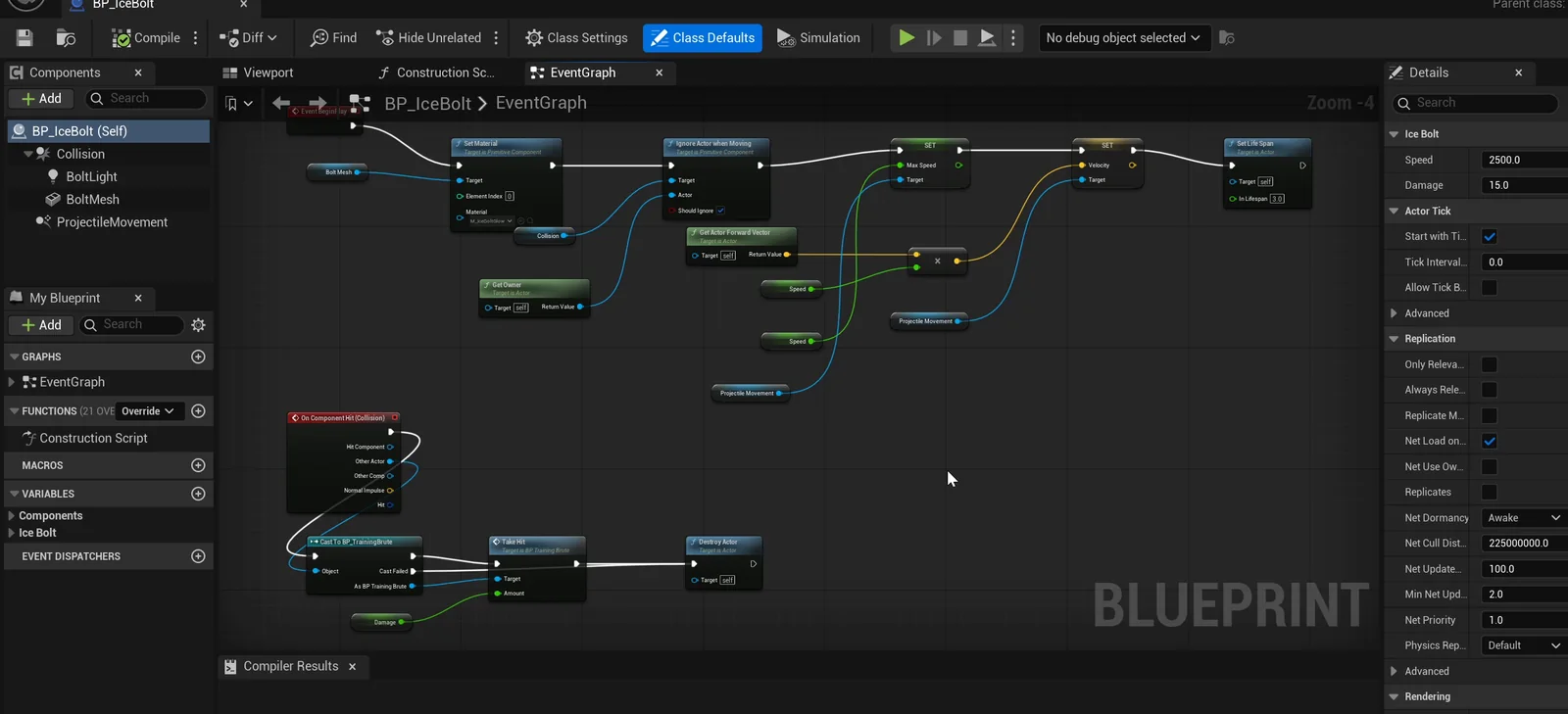
The bolt graph: it flies forward, and on a hit it tells the brute to take damage and destroys itself.
Then it wires the throw into the player. On F, the player plays the throw animation on the upper body slot and starts a timer of 0.3 seconds. A new event then spawns the bolt at the right hand socket.
Aiming on a slope
The AI also solved the aiming. The brutes stand on a slope about 130 units higher, so a bolt fired level from the hand would hit the snow. So on F the character turns to the camera, and the bolt flies toward the point 1500 units along the camera view.
The play test
The AI runs the test at quarter speed, so the delay of 0.3 seconds can be read reliably.
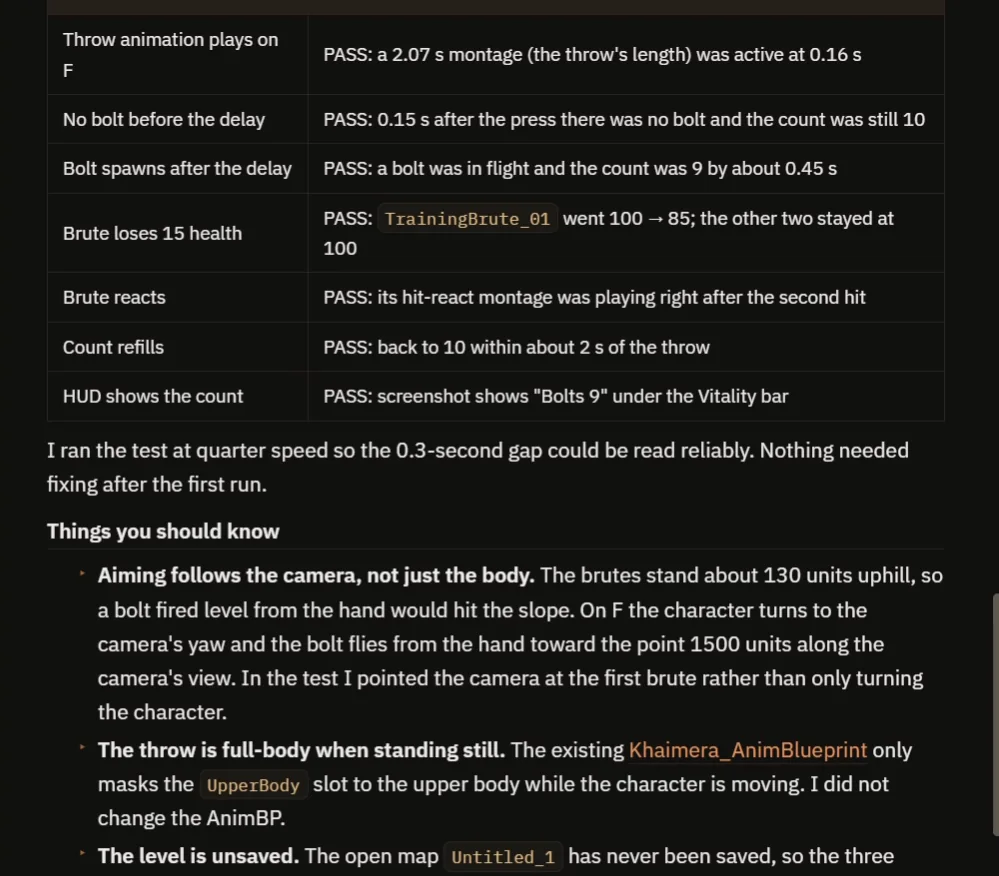
The timing table: the throw plays, no bolt exists at 0.15 s and a bolt is in flight at 0.45 s.
- The throw plays on F: a montage of 2.07 seconds, active at 0.16 s.
- 0.15 seconds after the press, there is no bolt yet and the count is still 10.
- By 0.45 seconds, a bolt is in flight and the count is 9.
- The first brute goes from 100 to 85 and plays its hit reaction. The other two stay at 100.
- The count is back to 10 within about 2 seconds.
Notes from the report
- Aiming follows the camera, not just the body. Point the camera at the target.
- The throw is full body when the character stands still. The project’s animation Blueprint only masks the upper body while moving, and the AI did not change it.
- The level is unsaved, and the main menu still opens over the game at the start. It comes from the game mode, and F worked behind it.
As in the previous episode, the AI’s test footage has the main menu on screen, and the video says so. The real walk and throws are recorded afterward.
How the timing works, in plain words
When you press F, two things start at the same moment: the animation, and a timer of 0.3 seconds. The bolt is not spawned by the key. It is spawned by the timer. That is why it leaves the hand when the arm moves forward. Change the delay variable and you change when the bolt leaves.
When the bolt hits a brute, it calls a function on the brute, take hit, with the damage. The brute then plays its own flash and its own reaction. The bolt does not need to know what the brute does. That is the same pattern for any weapon: a fireball, an arrow or a spell.
Because the speed, the damage and the delay are variables, you can tune them without opening the graph.
Ideas to extend it
- A charge: hold the key to throw a bigger bolt.
- A bolt that freezes the brute, using the stunned animation of the pack.
- An aiming dot on the screen.
- A bolt that bounces to a second target.
Four tips for weapon prompts
- Name the animation you want.
- Give the delay between the press and the projectile as a number.
- Say what the projectile hits, and how it reacts.
- Ask the AI to test the timing slowly.
Frequently asked questions
How do I spawn a projectile from a hand in Unreal Engine 5?
Start the throw animation and a short timer together, then spawn the projectile at the hand socket when the timer fires. The delay lines the spawn up with the arm movement.
Why does my projectile leave before the animation?
If it spawns on the key press, it leaves immediately. Spawn it from a timer or an animation notify instead, so it leaves when the hand moves.
How do I aim a projectile at targets on a slope?
Aim along the camera view instead of level from the hand. Here the bolt flies toward a point 1500 units along the camera, so it reaches brutes that stand uphill.
Try it in your project
See what Ultimate Engine CoPilot can build on the product page, or get it on Fab.
Previous in this series: Unreal Engine melee combat with hit reactions. More builds: the Unreal Engine speed boost.