快速开始
快速开始
你刚买了插件(或即将购买)。接下来的 10 分钟会带你从”已下载 zip”到”AI 在为我构建 Blueprints”。这是完整的旅程。
我们按顺序进行:
- 在引擎中安装插件
- 激活你的许可证
- 打开插件窗口
- 发送你的第一个 AI 提示
如果在某一步卡住,跳到底部的故障排除。
开始之前 — 你需要什么
| 项目 | 为什么 |
|---|---|
| Unreal Engine 5.4、5.5、5.6 或 5.7 | 插件运行在编辑器内 |
| Windows、macOS 或 Linux | 三者都可以 |
| 一个 FAB Marketplace 订单 ID 或 来自我们网站的许可证密钥 | 在你的机器上激活插件 |
就这么多。不需要 API 密钥,不需要安装 Python 或其他任何东西。 插件附带免费的 AI 使用 — 激活完成后你就可以试用。
第 1 步 — 安装插件
你在 FAB Marketplace 上买了插件。现在我们在引擎中安装它。
- 打开 Epic Games Launcher。
- 进入你的 Library。
- 在你的购买中找到插件,点击 Install to Engine。
- 选择要安装的引擎版本(5.4、5.5、5.6 或 5.7)。可以安装到多个 — 选择你会使用的版本。
- 等待安装完成。通常需要 1-2 分钟。
现在打开你的 Unreal Engine 项目:
- 在顶部菜单中进入 Edit → Plugins。
- 搜索 “Ultimate Engine Co-Pilot”。
- 勾选复选框启用它。
- 编辑器会要求你重启。点击 Restart Now。
编辑器回来后,插件已安装但还未激活。下一步。
第 2 步 — 激活你的许可证
启用插件后第一次重新打开编辑器时,会弹出激活窗口。有两种方式 — 选择与你购买方式匹配的那种。
如果你在 FAB Marketplace 上购买
- 点击 FAB Marketplace 选项卡。
- 输入你在 FAB 上使用的邮箱地址。
- 输入你的 FAB Order ID。以
A开头,后跟 16 位数字,如A1234567890123456。可在 FAB 在你购买时发送的邮件中找到。 - 点击 Submit Order。
- 等待。验证通常在 5 分钟内完成 — 插件会自动检查。激活后窗口会更新。
如果你在我们的网站上购买
- 点击 Website Purchase 选项卡。
- 输入你的许可证密钥。看起来像
XXXXX-XXXXX-XXXXX-XXXXX。 - 点击 Activate License。
无论哪种方式,激活成功后,插件就绑定到你的机器上。这只需要做一次。激活适用于这台计算机上的所有项目,并在编辑器重启后保留。
第 3 步 — 打开插件
通过以下方式打开插件窗口:
- Window 菜单 → Ultimate Engine Co-Pilot,或
- 顶部工具栏中的插件图标
窗口打开时会有四个主要选项卡,位于左上角:
| 选项卡 | 用途 |
|---|---|
| Blueprint Architect | 主聊天。你输入想要的内容,AI 构建它。 |
| Project Scanner | 索引整个项目,让 AI 可以回答关于其中任何内容的问题。 |
| Tools | 快速访问插件实用工具 — 图像生成、网格生成、声音生成等。 |
| Learn | 内置课程、教程和技能树,引导你了解插件。 |
你还会看到右上角的齿轮图标和左下角的 Settings 按钮 — 两者都打开同一个 Settings 面板。在那里配置 AI 提供商、主题、语音和其他所有内容。
左下角的条带还有 Instructions、GDD 和 AI Memory 的快捷方式 — 你之后会接触到的功能。对于第一个提示,点击 Blueprint Architect。
第 4 步 — 试试你的第一个提示
你已经在聊天中。在底部的消息框中输入:
Create a third person character with movement and a health system按 Enter(或点击 Send)。
你会看到 AI 实时工作:
- 显示一个消息气泡,包含 AI 的计划
- 工具调用滚动显示,因为 AI 创建 Blueprint、添加组件、设置变量、连接逻辑
- 完成后,你的项目中就有一个工作的 Blueprint
就这样。 你已经准备就绪。
如果想要更具体的东西,试试以下之一:
Make me a UI widget with a health bar that fills based on a player variableCreate a Niagara system that emits sparks when an actor takes damageBuild a save system that stores player position and inventoryAI 都能处理。
你免费获得什么
插件附带免费 AI 使用。可以直接使用 — 无需注册、无需 API 密钥、无需付费。包括两个免费选项:
- Blueprints Lab 1.1 — 更强大的,适合大任务
- Blueprints Lab 0.9 — 更快,适合快速编辑
每个选项每天有使用限制。如果达到限制,可以等待限制重置,或设置自己的 AI 提供商(我们支持 OpenAI、Claude、Gemini、DeepSeek 等 — 见 AI 提供商)。
提供商插槽和 ALT+1 到 ALT+9 热键
插件给你 9 个提供商插槽,可通过左 ALT + 1 到左 ALT + 9 切换。每个插槽可独立配置 — 你可以将一个插槽设置为使用免费层,另一个使用 Claude API 密钥,另一个运行本地 LLM,另一个驱动 Claude Code 这样的 CLI 代理,等等。
随时按 ALT+3,活动插槽就切换到插槽 3。会弹出小的 toast 确认切换(例如 “Switched to: Claude API”)。更改适用于你发送的下一条消息 — AI 当前正在生成的任何回复通过旧插槽完成,你的下一个提示通过新插槽发送。这让你可以用单个按键在便宜快速和强大昂贵之间切换,而不会打断对话流。
支持的引擎和平台
| 引擎版本 | 状态 |
|---|---|
| Unreal Engine 5.4 | 支持 |
| Unreal Engine 5.5 | 支持 |
| Unreal Engine 5.6 | 支持 |
| Unreal Engine 5.7 | 支持 |
| 平台 | 状态 |
|---|---|
| Windows | 支持 |
| macOS | 支持 |
| Linux | 支持 |
插件仅编辑器 — 它帮你构建游戏,但不会包含在你发布的游戏中。你的玩家永远不需要它。
更新插件
有两种更新。
新插件版本
当我们发布带有错误修复或新功能的新版本:
- 打开 Epic Games Launcher。
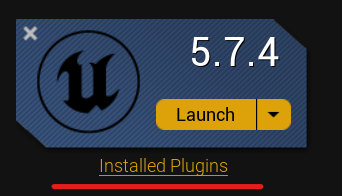
- 进入 Library → 在你的引擎版本下点击 Installed Plugins。
- 如果有可用更新,你会在插件旁边看到 Update 按钮。
- 点击 Update 并等待它安装。
- 重启 Unreal Editor。
云内容更新
某些东西在后台自动更新 — AI 提示文件、工具文档、模型列表。不需要重新安装就能获取这些。下次启动加载了插件的编辑器时它们会同步。
可以在 Settings → Updates 中查看你当前的插件版本(和云更新状态)。
删除或重新安装插件
如果出了问题想从头开始:
第 1 步 — 从引擎中删除
- 打开 Epic Games Launcher。
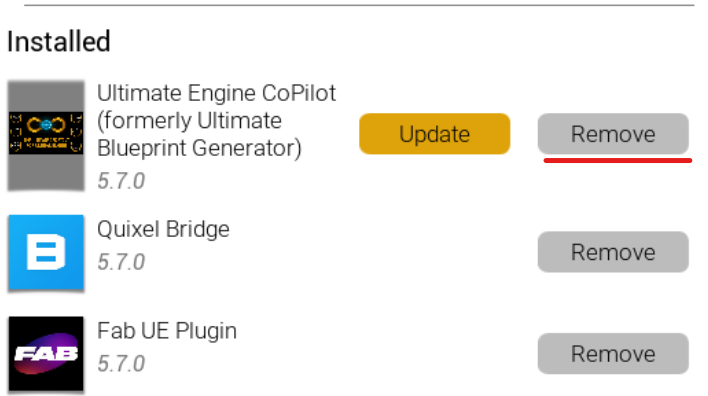
- 进入 Library → Installed Plugins。
- 找到插件,点击 Remove。
第 2 步 — 删除遗留文件(显示的是 Windows 路径)
删除后,检查没有任何遗留。打开文件资源管理器,前往:
C:\Program Files\Epic Games\UE_5.X\Engine\Plugins\Marketplace\UltimateBlueprintGenerator将 5.X 替换为你的引擎版本。如果文件夹仍在,删除它。
**关于文件夹名称的说明:**插件的面向用户的品牌是 Ultimate Engine Co-Pilot,但磁盘上的文件夹保留了较旧的名称(UltimateBlueprintGenerator)。这是有意为之 — 重命名会丢失你保存的设置。
第 3 步 — 重新安装
回到你的 FAB Library,找到插件,点击 Install to Engine 并选择你的引擎版本。你会得到一个全新的副本。
你的激活仍然有效 — 不必再次输入许可证密钥或订单 ID。
故障排除
激活窗口未出现。 插件仅在启用后首次启动时显示激活窗口。手动打开插件窗口(Window → Ultimate Engine Co-Pilot)— 激活将出现在 Settings 面板下的 License 中。
验证花费超过 5 分钟。 FAB 偶尔有延迟。可以保持激活窗口打开 — 它每 30 秒自动检查一次。如果 30 分钟过去仍无结果,仔细检查你输入的订单 ID 和邮箱与 FAB 收据上的完全匹配。
插件未出现在 Plugins 菜单中。 确保你将其安装到正确的引擎版本中。可以安装到多个版本 — 每个安装是独立的。启用后重启编辑器。
免费 AI 立即显示 “rate limited”。 你可能在另一个项目中用完了每日配额。配额在 UTC 午夜重置。等待时,可以在 Settings → AI Models 中接入你自己的 AI 提供商 — 见 AI 提供商。
如果你遇到不在此列表中的内容,FAQ 涵盖了更多边缘情况。仍然卡住?在 Discord 上找我们。
接下来读什么
现在你已经准备就绪,最有用的下一阅读:
- Blueprint Architect — AI 聊天的细节,包括四种交互模式(just chat、ask before edit、plan、auto edit)
- AI 提供商 — 如何使用你自己的 OpenAI / Claude / Gemini 密钥进行无限使用
- Project Scanner — 索引整个项目,让 AI 可以推理其中任何内容
欢迎加入。